AI Agents for Business: 10 Real Examples with Measurable ROI
10 min read · AstraLoop Studio
The difference between a chatbot and an AI agent shows up when you need to do something, not just when you need to ask something. A chatbot answers a question. An agent reads an invoice, checks it against the order in the system, flags the discrepancy and opens a ticket, with no one telling it step by step what to do. It's this operational autonomy that makes AI agents for business interesting (and risky, if left unchecked).
In this article you'll find 10 real vertical examples, grouped by business area, with plausible ROI figures and the guardrails needed to make them work in production. No polished demos: this is about what really happens when an agent enters a process tied to revenue or regulatory risk. If you want the strategic overview first, start with our complete guide to AI consulting for businesses, which maps out everything else. And if you need the basic distinction spelled out, we have a dedicated piece on what AI agents are.
Chatbot or agent? The distinction that changes the ROI
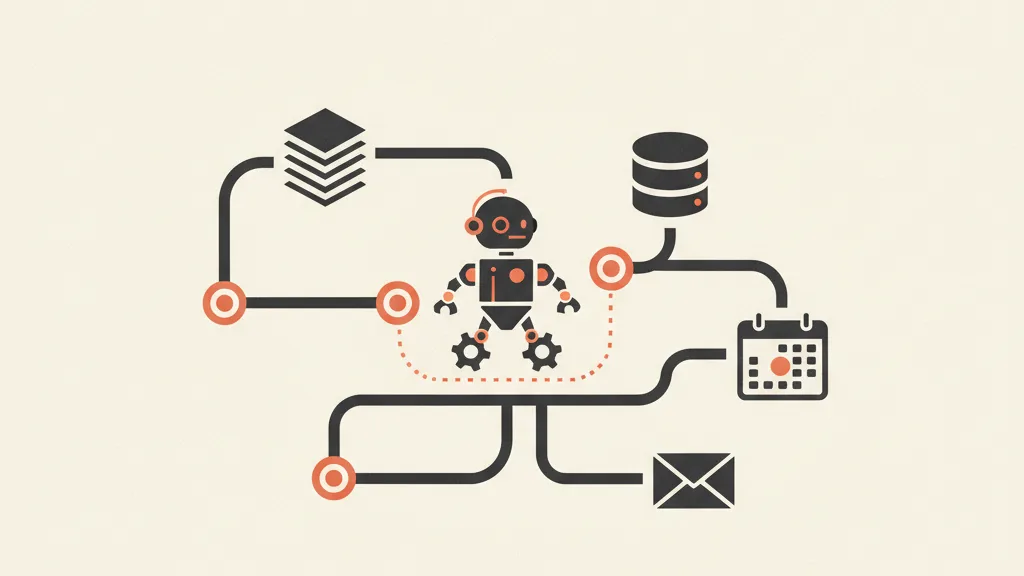
Before the examples, let's draw a line. A chatbot lives inside a conversation and stops there. An agent has three extra capabilities that shift the P&L:
- Reading real context: it queries the CRM, the ERP, a document database (often via RAG on a company knowledge base) instead of answering from memory.
- Acting on systems: it writes to a management system, sends an email, creates a ticket, updates a status.
- Chaining steps: it plans a sequence of operations and executes it, not just a single turn.
The practical consequence is that an agent doesn't save you “minutes of typing” — it takes entire processes off people's plates. But autonomy comes with risk: a chatbot that gets it wrong gives an imprecise answer, an agent that gets it wrong sends the wrong invoice or promises a refund it shouldn't. That's why every example below has an implicit column called “guardrail.” We go deeper on the technical difference in our piece on the difference between a chatbot and an AI agent.
Finance and admin: 3 examples
1. Invoice-to-order reconciliation (accounts payable)
The agent receives incoming invoices (PDF, email, supplier portal), extracts the data, checks it against the order and delivery note in the system (three-way match), and routes only the exceptions to a human. On a cycle of around 1,500 invoices a month, a two-person team that used to spend 60% of its time on manual matching can drop to handling just 10-15% of anomalous cases.
- ROI: roughly 90-110 hours a month freed up. At €25 an hour fully loaded, that's €2,300-2,700 a month of reallocated capacity.
- Payback: typically 4-7 months, including setup and integration.
- Guardrail: an amount threshold above which human approval always kicks in; the agent prepares payments, it never posts them.
2. Collections and overdue-account management
The agent monitors the aging report, segments customers by risk and debt age, and generates personalized reminders (progressive tone, from a polite nudge to a formal notice), leaving only sensitive cases or strategic accounts to a person. It shortens average collection days (DSO) and recovers receivables that would otherwise “age out.”
- ROI: a 5-8 day improvement in DSO on €3 million in revenue frees up tens of thousands of euros in cash. The value here is financial, not just time saved.
- Guardrail: no automatic reminders to whitelisted accounts; tone and copy pre-approved.
3. Expense analysis and cost anomalies
The agent reads expense reports and corporate card transactions, applies internal policy, and flags violations (out-of-threshold amounts, disallowed categories, duplicates). It doesn't block anything automatically: it prepares an exception report for financial control.
- ROI: 2-4% recovered on an expense budget, plus the controller's time.
- Guardrail: the agent flags, the human decides. Full logging of every evaluation for audit purposes.
Sales: 3 examples that touch revenue
4. Inbound lead qualification and enrichment
Every incoming lead gets enriched (company data, industry, size), scored, and routed to the right salesperson within minutes instead of by end of day. We've written more on AI agents for lead generation, and the scoring mechanism is explained in what lead scoring is.
- ROI: the decisive factor is response speed. Contacting a lead within 5 minutes instead of an hour later can multiply the contact rate. Even a 10-15% increase in leads worked on time flows straight into pipeline.
- Guardrail: a scoring threshold above which the salesperson always sees the raw lead, so no opportunities are lost to a model that scores them wrong.
5. Sales follow-up and reactivation
The agent handles the follow-ups salespeople forget: quotes never called back on, stalled deals, dormant contacts. It prepares the sequence, personalizes the message, and hands off to a human at the first sign of interest. It's the core of AI-driven sales follow-up automation and ties into reactivating dormant customers from your database.
- ROI: recovering even 3-5% of otherwise-lost deals, on an average order value of €2,000, pays back very quickly.
- Guardrail: a maximum contact cadence so the relationship isn't burned; automatic stop if the customer responds negatively.
6. Call prep and sales briefings
Before every meeting, the agent compiles a briefing: the customer's history from the CRM, recent interactions, company news, open items. The salesperson walks in prepared instead of improvising.
- ROI: 20-30 minutes saved per prepared call, multiplied by the number of meetings. On a team of 4 salespeople with 15 calls a week each, that adds up to dozens of hours a month.
- Guardrail: sources cited in the briefing, so the salesperson verifies instead of trusting it blindly.
Customer operations: 2 examples
7. First-line support that acts, not just answers
Not the usual FAQ chatbot. The agent handles recurring requests by performing the action: address change, order status, return request, booking change, querying the real systems. It only escalates to a human agent the cases it can't close on its own. That handoff moment is the trickiest part: it's worth reading how to set up human handoff properly, and more broadly, AI-driven customer care automation.
- ROI: 30-50% deflection on first-line tickets. On 3,000 tickets a month at €6 average cost per ticket, that's €5,400-9,000 a month.
- Guardrail: the agent never promises refunds or credits above a set threshold; every irreversible action requires confirmation.
8. Booking management and inbound calls
For local businesses and clinics, the voice agent answers, qualifies, books into the calendar and logs everything in the management system, even outside business hours. It cuts down on missed calls, which for a local business mean lost customers. We have vertical case studies on AI voice assistants for medical practices and on AI bookings for restaurants. One often-overlooked obligation, though: since 2025, there's a legal requirement to disclose AI on the phone.
- ROI: a missed call at a local business can be worth €50-200 in lost revenue. Recovering even a handful a day pays the system back quickly.
- Guardrail: AI identity disclosed at the start of the call; escalation to a real person on explicit request.
Want to figure out which process in your business is a fit for an AI agent with real ROI and controlled risk? Request an analysis: we start from your actual case, not generic slides.
Compliance and documents: 2 high-risk examples
9. Contract screening and risky clauses
The agent reads contracts and tender specs, highlights the critical clauses (penalties, tacit renewals, jurisdiction, liability), and prepares a summary for legal. It doesn't decide, it filters: it surfaces in minutes what would take hours to read.
- ROI: 60-70% of first-read time saved on standard contracts, with the human focused on the exceptions.
- Guardrail: an absolute ban on giving definitive legal opinions. Every flagged item links back to the original text with the exact reference. Human-in-the-loop mandatory before signing.
10. Regulatory monitoring and AI literacy
The agent tracks regulatory deadlines, cross-references the AI tools used in the company against upcoming obligations, and prepares reminders and checklists. The topic is red-hot: the AI Act and its obligations for SMEs are taking full effect, and Article 4 of EU Regulation 2024/1689 already requires AI literacy for anyone using these tools. With penalties that can reach up to €35 million or 7% of global turnover for the most serious violations, having this monitoring in place is worth it.
- ROI: here the return is in risk avoided, not hours. An avoided fine or an audit passed without findings is worth far more than the cost of the agent.
- Guardrail: the agent informs and prepares, it doesn't certify compliance. Sources cited are official (EU Regulation 2024/1689, guidance from the Italian Data Protection Authority, ACN where relevant).
How to actually read the ROI of an AI agent
The formula we use with clients is simple and honest:
| Component | How it's calculated |
|---|---|
| Hours freed up | hours per month saved times fully-loaded hourly cost |
| Extra revenue | recovered deals, saved calls, earlier collections |
| Costs | setup, integration, maintenance, model drift, licenses |
| ROI | (hours freed up plus extra revenue minus costs) divided by costs |
Realistic payback for a well-scoped agent is 4-12 months. If someone promises you two weeks, be skeptical. And don't forget recurring costs: a model needs monitoring, because response quality drifts over time (model drift), and that carries a maintenance cost. We go deeper on the method in how to measure AI ROI.
Why so many agents fail in production (and how to avoid it)
About 85% of generative AI pilot projects never reach production. Not because of model limitations, but because of how they're set up. The three recurring reasons are these:
- Scope too broad: “the agent that does everything” fails. The ones that work do one specific thing and do it well.
- Zero change management: if people don't understand what the agent does and fear for their jobs, they'll sabotage it. The human factor is the number one cause of failure, not the technology.
- No plan for when it gets it wrong: an agent in production will make mistakes. The question isn't “if,” it's “what happens when.” You need guardrails, human-in-the-loop on irreversible actions, full logging, and a rollback mechanism.
We've written a whole piece on why AI projects fail and one on the 4-phase AI adoption roadmap (assessment, pilot, scale-up, monitoring), which is the pragmatic way to stay out of that 85%.
The non-negotiable guardrails
- Thresholds above which human approval always kicks in (amounts, irreversible actions).
- Human-in-the-loop on anything touching money, contracts, or sensitive data.
- Logging of every decision the agent makes, for audit purposes and AI Act compliance.
- Shadow AI governance: knowing who uses what. If you don't know what tools are running in your company, read what Shadow AI is and its risks.
- A stop-and-rollback mechanism: being able to switch the agent off in one click.
An AI agent in production isn't “install and forget.” It's a system that lives inside real processes and needs to be kept under control, like any team member you delegate something important to.
Where to actually start
You don't need a revolution. You need to pick a high-volume, low-risk process (one of the first examples on this list), scope it, add guardrails, and measure. Then scale up what worked. If you want to understand how to fold AI into your processes without breaking anything, read how to integrate AI into business processes and what to automate in your business with AI. The rule is always the same: start where the return is clearest and the risk is lowest.
Frequently asked questions
What's the difference between a chatbot and an AI agent?
A chatbot answers questions inside a conversation and stops there. An AI agent reads real data (CRM, ERP, documents), plans a sequence of steps, and acts on systems: it opens tickets, sends emails, updates statuses. More autonomy means more value, but also more need for guardrails.
How much does an AI agent cost for a business?
It depends on the scope. An agent on a single well-defined process has setup, integration, and recurring maintenance costs (including monitoring for model drift). Realistic payback is 4-12 months. Be wary of anyone promising returns in two weeks or hiding recurring costs.
Are AI agents safe for processes that touch money or contracts?
Only with proper guardrails. The rule is human-in-the-loop on anything irreversible: payments, signatures, refunds above a threshold. The agent prepares and flags, the person decides. You also need full logging for audits and a way to shut it off in one click.
Why do so many AI agent projects fail?
About 85% of pilots never reach production, almost always for three reasons: scope too broad, lack of change management (the human factor), and no plan for when the agent gets it wrong. It's not a technology limitation, it's a setup problem.
Does an AI agent make me compliant with the AI Act?
No, an agent doesn't certify compliance. But using AI tools comes with obligations: Article 4 of EU Regulation 2024/1689 requires AI literacy, and penalties for serious violations reach up to €35 million or 7% of global turnover. You need governance, not just technology.
Which process is best to start with?
One with high volume and low risk: invoice reconciliation, lead qualification, sales follow-up, or first-line support. Scope it, add guardrails, measure the ROI, then scale up what worked. Avoid the agent that claims to do everything.
If you have a process in mind to automate but you're worried the agent will get it wrong in production, let's talk: we'll set up the scope, guardrails, and metrics together, before writing a single line of code.