Facebook Lead Generation: Turning Contacts Into Customers
9 min read · AstraLoop Studio
The problem isn't generating leads. It's generating leads who buy
You open Ads Manager, launch a Lead campaign with an instant form, offer a discount or a free guide, and within two days you have 80 contacts at €2.50 each. On paper, that's a win. Then your sales rep starts calling and discovers half the numbers don't answer, a quarter clicked by accident, and almost none of the rest remember leaving their details. You end up closing two appointments. Cost per lead looked great; cost per customer is a disaster.
This is the scenario we see most often when a company asks us why Facebook lead generation isn't working. In almost every case, it works brilliantly at generating contacts. What's missing is the system that turns them into customers: qualification, fast follow-up, a real connection to the CRM. Facebook fills the top of the funnel, but if there's no filter underneath working those contacts, the water just leaks out through the cracks.
In this article we won't walk you through setting up a Lead campaign the generic way you find everywhere else. We'll show you how to build the full system - creative, form, qualification, CRM, follow-up - that makes the difference between a spreadsheet full of names and a calendar full of real appointments.
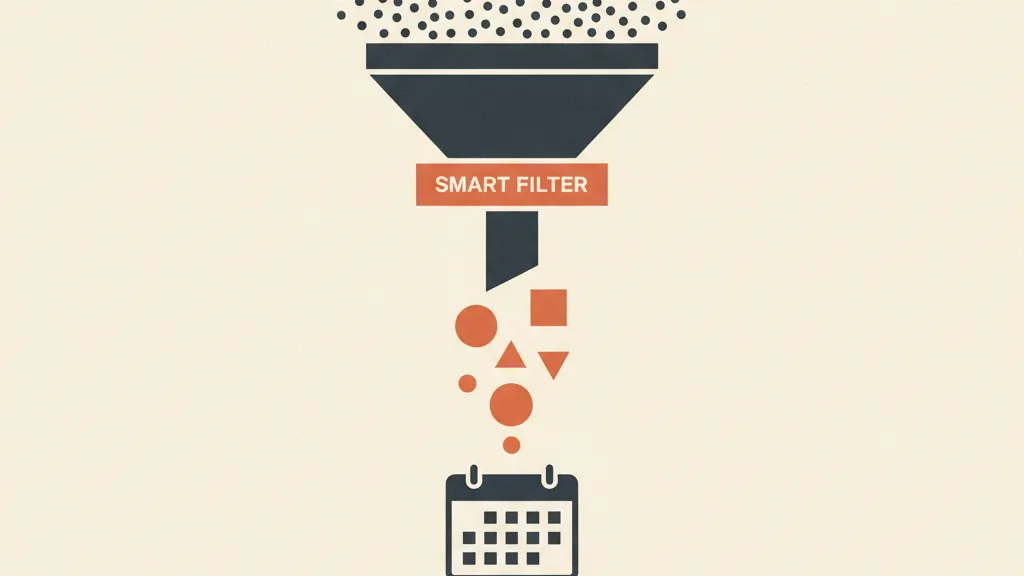
Why Facebook leads arrive cold (and how to warm one up)
A lead who finds you on Google has an active question: they're already searching for what you sell. A lead who finds you on Facebook was watching cat videos and your ad interrupted them. That's latent interest, not intent. This is the nature of the channel, not a flaw in your campaigns, and it's why contacts from Meta need a qualification and warming process that search leads sometimes skip.
The practical consequence is simple: treat a Facebook lead like a Google lead and send a quote on first contact, and you burn most of the potential. The contact needs warming up. And the factor that matters most for warming a lead isn't the perfect email sequence - it's response speed.
Several studies on inbound lead management show the same pattern: the odds of successfully qualifying a contact drop off a cliff after the first few minutes. A lead contacted within 5 minutes of filling out a form converts at a far higher rate than one contacted an hour later, and after 24 hours the drop is dramatic. The problem is that no human sales rep can respond within 5 minutes to every lead, 7 days a week. And that's exactly where automation changes the rules.
The three places where leads get lost (and how to seal them)
1. The form: too easy means junk leads
Meta's instant lead forms are convenient because they pre-fill name, email and phone from the profile. Very convenient for people who click without thinking, too. The result is high volume and low quality. Meta offers two levers to flip that:
- Higher-intent form: adds a review step before submission. Fewer leads, far more qualified. In most B2B cases and for high-value services, this is the right call.
- Custom questions: one or two conditional questions (rough budget, timeline, type of need) filter out the curious before they ever reach the CRM. Anyone unwilling to answer wasn't a customer anyway.
Be careful not to overdo it: every extra question lowers the completion rate. The game is finding the two questions that separate the curious from the genuine prospect. We've written a dedicated guide on Meta lead ad form quality that goes into the configuration details.
2. The creative: attract the curious, and curious is what you'll get
The creative doesn't just stop the scroll - it pre-qualifies. An ad shouting 50% OFF attracts discount hunters. An ad that speaks to your ideal customer's specific problem (say, you run a dental practice and want to fill your calendar without aggressive discounting) attracts people who actually have that problem. The message filters the audience before the click.
The practical rule is this: the creative should name the ideal customer and their problem, not just the offer. It costs you a few clicks, but the clicks that remain are worth more. If you're starting from scratch, our guides on writing Facebook ad copy that sells and on Meta ad creatives that stop the scroll give you the method.
3. Follow-up: the crack where all the water escapes
This is the point that sinks 80% of campaigns. The lead comes in, lands in a spreadsheet or an inbox, and gets contacted whenever the sales rep has time. That delay is the difference between a warm contact and a dead number. A serious system reaches out to every lead within minutes, qualifies them, and only the qualified ones land on the sales rep's desk. Here's how.
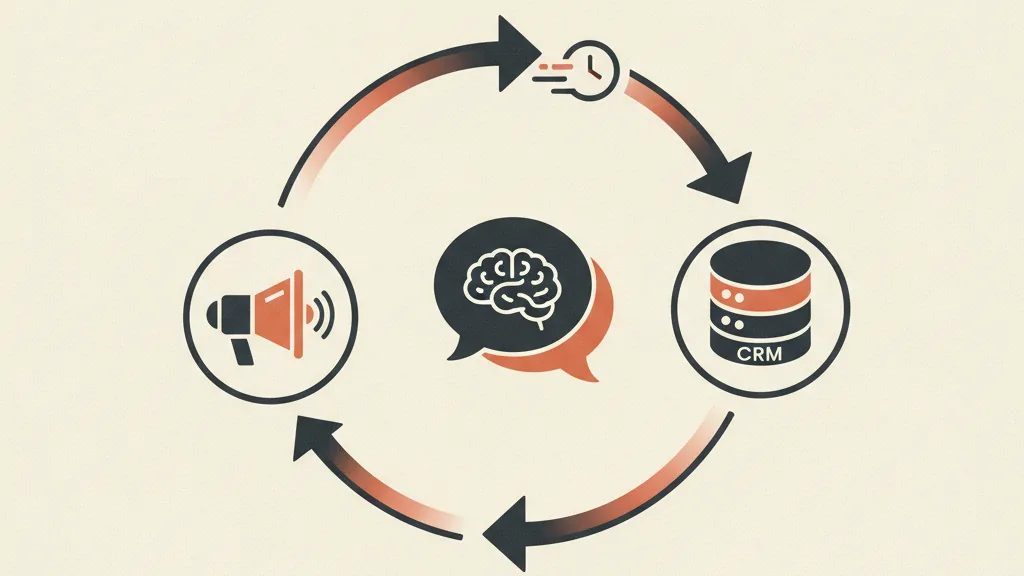
The system that turns contacts into appointments
Here's the full flow we run for our clients. It's not theory - it's the sequence that connects Meta Ads, an AI qualification agent and the CRM into a single loop.
- The lead fills out the Meta form (or a dedicated landing page, when more context is needed).
- The contact enters the CRM in real time via direct integration or webhook, not a manual CSV export at the end of the day.
- An AI agent reaches the lead within minutes on WhatsApp or by phone. It asks 3-4 qualifying questions, answers initial questions, and figures out whether there's a real fit.
- Qualified leads get booked on the calendar autonomously by the agent, with the appointment synced to the sales rep's calendar.
- Leads that aren't ready enter an automatic nurturing sequence, so they stay warm until they are, without anyone having to remember to follow up.
The difference from the traditional method is stark: the sales rep no longer dials 80 numbers to find 5 good ones. They receive the 5 qualified appointments directly, with the conversation history already in the CRM. The cost per Facebook lead stays the same, but the cost per appointment and cost per customer collapse.
Automated qualification is the heart of the system. If you want to see how it works in practice, we've dedicated two deep dives to the topic: how an AI agent qualifies leads on WhatsApp and how a chatbot AI carries contacts all the way to the appointment.
Meta Ads and CRM: why the connection is everything (even for the algorithm)
Connecting leads to your CRM isn't just about working them well internally. It's also about teaching Meta's algorithm what a good customer looks like. Here's the mechanism almost nobody uses.
When a lead becomes a customer (or even just a qualified appointment), that signal can be sent back to Meta through offline conversions via the Conversions API. In practice, you're telling the algorithm that this type of person bought. Meta uses that data to optimize and find more similar profiles, going beyond the lead itself and aiming at the lead who converts. That's the difference between optimizing for volume of contacts and optimizing for revenue.
In the post-privacy era this step matters even more, since the pixel alone sees less and less on its own. We cover this in detail in our guide to offline conversions connecting Meta and your CRM and in the one on which conversion signals to pass from your CRM to Meta.
| Approach | Basic lead generation | System with qualification and CRM |
|---|---|---|
| What you optimize for | Cost per lead | Cost per qualified appointment |
| Response speed | Hours or days | A few minutes, 24/7 |
| Who works the leads | The sales rep, every one | AI agent qualifies, rep closes the good ones |
| Signal sent to Meta | Lead received only | Lead became a customer (offline conversions) |
| Typical result | Many names, few customers | Fewer names, more real appointments |
Want to understand where you're losing Facebook leads before they become customers? Ask us for a funnel review - we'll look together at whether the problem is the campaign or the system around it.
The metrics that matter (stop celebrating CPL)
Cost per lead is the most overrated metric in lead generation. A low CPL makes you feel great while revenue doesn't budge. The metrics that actually matter sit further down the funnel:
- Cost per qualified lead: what a contact who's a genuine fit actually costs you, not just any contact.
- Cost per booked appointment: the most honest metric before the sale.
- Customer acquisition cost (CAC): the only one that pays the bills. If you don't know it, you're driving blindfolded.
- Show-up rate: how many booked appointments actually happen. Automated reminders make a huge difference here.
The rule is simple: optimize for CPL and you'll get cheap, useless leads. Optimize for cost per qualified appointment, and the machine starts pushing toward contacts that are actually worth something. To build a sensible dashboard, our guides to the Meta Ads KPIs that actually matter and to lowering Facebook CPL without gutting quality will help.
Mistakes we keep seeing (and that cost you money)
- Using a discount as a lead magnet for a high-value service. You attract price shoppers, not solution seekers. For services, a piece of valuable content (a free audit, guide, or checklist) that qualifies on genuine interest works far better.
- Having no automated follow-up. If first contact depends on whenever the sales rep has a spare moment, you've already lost. We wrote about this in automating sales follow-up with AI.
- Watching only the CPL. See above. It's mistake number one.
- Not passing conversion data back to Meta. The algorithm stays blind to quality and keeps feeding you cheap, poor leads because that's what it's optimizing for.
- Sending every lead straight to sales. Without a filter, the sales rep burns time on curious browsers and loses motivation. Upstream qualification protects the time of your most expensive people.
If you recognize two or three of these in your own situation, the problem isn't Facebook. It's the system around Facebook. The good news is that it can be built, and it's repeatable. Many of these principles go beyond a single channel - you'll find them in our pillar guide on building a customer acquisition system and in our guide to B2B lead generation.
Where to start
You don't need to rebuild everything at once. Here's the priority order we recommend:
- Connect leads to your CRM in real time. No more manual exports. This is the foundation.
- Add automated follow-up within the first few minutes. Even a single instant automated WhatsApp message changes the numbers.
- Add qualification (form questions or an AI agent), so the sales rep only sees the good ones.
- Close the loop with offline conversions, so Meta optimizes for real customers, not just clicks.
Each step improves on the last. And the result isn't more leads - it's more appointments from the same ad spend. That's the point where Facebook lead generation stops being a cost and becomes a predictable acquisition channel.
Frequently asked questions
How much does a Facebook lead cost in Italy?
It varies a lot by industry and offer: anywhere from under €2 per lead for simple B2C offers to €20-40 or more for B2B leads on high-value services. But cost per lead matters little - the useful metric is cost per qualified appointment or per customer, which depends on qualification and follow-up, not just the campaign.
Are Meta lead forms better than a landing page?
Meta's instant forms have higher completion rates because they pre-fill data, but they tend to generate less qualified leads. A landing page asks more effort from the user (which filters them) and lets you tell the offer's story better. For high-value services, a landing page or a higher-intent Meta form with qualifying questions is often the better choice.
Why aren't my Facebook leads answering the phone?
Almost always for two reasons: the contact is cold (on Facebook, interest is latent, not active) and they're being contacted too late. The odds of reaching a lead drop sharply after the first few minutes. An immediate automated follow-up via WhatsApp or phone, before the sales rep even calls, radically changes response rates.
How do you qualify a lead that comes from Facebook?
Qualification happens on three levels: upstream, through the creative and the form questions (which filter the audience before the click); then through a quick contact that checks need, rough budget and timeline; and finally through scoring in the CRM. An AI agent can handle the first round of qualification autonomously within minutes, so only genuine-fit contacts reach the sales rep.
How do I connect Facebook Ads to my CRM?
The connection can happen via native integration, automation connectors, or a webhook that sends every new lead to the CRM in real time. The next step, often overlooked, is sending conversion data back to Meta (leads that became customers) via offline conversions through the Conversions API: that way the algorithm learns to look for profiles similar to real customers, not just contacts.
Does Facebook Ads still work for lead generation in 2026?
Yes, and it remains one of the most efficient channels for volume and cost per contact, especially with Advantage+'s AI-driven optimization. What's changed is that the winners are the ones with the full system in place: qualification, a connected CRM, and conversion signals passed back to Meta. Anyone who stops at the lead form gets cheap contacts and few customers.
If you want to connect Meta Ads, your CRM and an AI agent that qualifies contacts for you, let's talk - we'll build the system tailored to your business.