AI Agent for Qualifying WhatsApp Leads: How to Filter and Book Appointments Automatically
9 min read · AstraLoop Studio
A lead messages you on WhatsApp at 10:40 PM. They want information — maybe they're ready to buy, maybe they're just browsing. If you reply the next morning at 9, in most cases you've already lost: they've also messaged three competitors, and whoever answered first got the appointment. Speed on WhatsApp isn't a detail — it's the whole game. Messages get opened 98% of the time (versus roughly 20% for email), and replying within a few minutes doubles your odds of engagement.
The problem is that no sales team can stay glued to the phone 24/7 sorting messages, half of which are time-wasters or off-target inquiries. That's where an AI agent comes in: a system that receives the message, figures out who it's dealing with, asks the right questions, screens out anyone off-target, and books the appointment only with leads worth pursuing. Automatically, in Italian, in your brand's tone.
In this guide, we'll look at how it actually works, what you need to set it up, how much it costs to manage WhatsApp conversations, and where the line sits between useful automation and a chatbot that drives customers away.

What "qualifying a lead" means on WhatsApp
Qualifying means quickly sorting the people messaging you into three groups: those who are ready and a good fit (send straight to the calendar), those who are interested but not quite there yet (nurture them), and those who aren't a match (politely say goodbye without wasting time). A good salesperson does this instinctively in two or three exchanges. The problem is that it doesn't scale: if you get 40 messages a day, those two or three exchanges times 40 become a full-time job that eats into actual selling time.
An AI qualification agent does the same thing, but without getting tired and without skipping leads that come in overnight or on weekends. In practice, it gathers the data you need to decide whether a contact deserves a call: type of need, rough budget, timeline, location, and whether they're the decision-maker or need to check with someone else. It's the same information that separates a qualified lead (MQL or SQL) from a casual browser — except it's extracted through conversation, not a cold form that nobody fills out to the end.
The difference from a traditional chatbot is substantial. The old button-based chatbot ("Press 1 for information, 2 for support") is a phone menu in disguise. An AI agent, on the other hand, understands natural language, remembers the conversation, and adapts its questions to the answers it gets. If you want to dig deeper into this shift, we covered it in a piece on the difference between a chatbot and an AI agent.
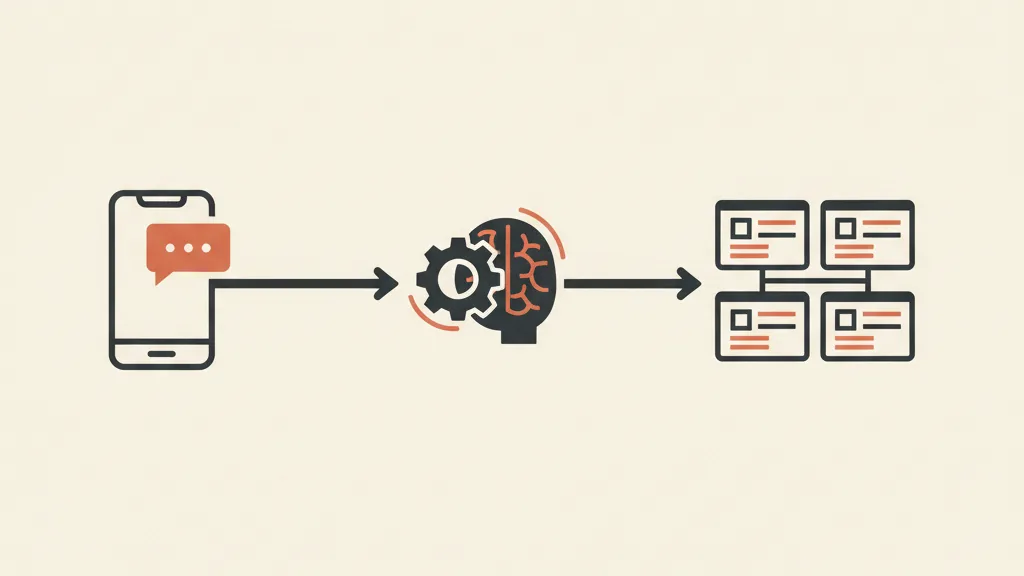
The step-by-step flow: from message to booking
Let's look at what actually happens, technically, when a lead enters the system. Picture someone clicking on your Facebook ad or filling out a landing page and leaving their number, or someone who messages your WhatsApp Business number on their own.
- Instant engagement. Within seconds, the agent sends the first message. Not a generic template, but a contextual opener: if the lead came from a specific ad, the message references that product or service. This immediately lowers the drop-off rate.
- Conversational qualification. The agent asks the questions you've defined, one at a time, in a natural way. No interrogation: it alternates questions with useful information, keeps the brand's tone, and replies in the customer's language.
- Real-time scoring. As it collects answers, the system assigns the lead a score based on the criteria you've set (budget above a threshold, service area, matching need). It's the same logic as lead scoring, applied live during the chat.
- Smart routing. Based on the score, the lead is routed accordingly: hot, on-target leads move to the next step (booking), lukewarm ones enter a nurturing sequence, and off-target ones get a polite reply and are closed out without tying up a salesperson.
- Calendar booking. For qualified leads, the agent shows the open slots from your calendar, lets them pick a time, confirms, and creates the event. No more back-and-forth messages like "when are you free?"
- CRM logging. All the data collected (name, need, budget, outcome) ends up in the CRM connected to WhatsApp, tagged correctly. The salesperson finds the record already prepared and shows up to the call ready.
The result is that your team no longer touches cold or off-target leads: they open the calendar and find appointments already filtered, with full context. They go from acting as a switchboard to acting as a salesperson.
Why WhatsApp instead of email or forms
The numbers speak for themselves, and it's worth keeping them in mind when deciding where to focus your efforts.
| Channel | Open rate | Typical response rate | Speed |
|---|---|---|---|
| ~98% | 45-60% | Immediate | |
| ~20% | 2-5% | Hours or days | |
| Static web form | Not applicable | High abandonment beyond 4-5 fields | No conversation |
The web form has a structural flaw: it asks for everything up front, before the lead has gotten anything in return, and the more fields you add, the more people abandon it. WhatsApp flips that logic: you collect data during a conversation, one piece at a time, once the person is already engaged. And it's where Italian customers already are, with no new apps to download or links to open. It's no coincidence that automating WhatsApp Business with AI has become one of the most concrete acquisition channels around.
How much it costs to manage the conversations
Let's be precise here, because WhatsApp's cost model differs from SMS or email. Meta doesn't charge per message but per conversation, where a conversation is a 24-hour window. Here are indicative figures (always double-check the latest Meta and provider pricing, since they vary by country and category):
- Customer-initiated conversations (they message you first, typical for inbound leads): often free or very low cost within the service window.
- Business-initiated conversations (you reach out first, for example a follow-up after 24 hours): typically between a few cents and around €0.10 per conversation, depending on the country and whether it falls under the "utility" or "marketing" category.
- Provider cost (BSP): whoever gives you access to the WhatsApp Business API charges its own fee, separate from Meta's.
- AI engine cost: the model running the agent has a token-based or subscription cost, usually marginal compared to the value of a closed appointment.
The economic logic to focus on isn't the cost per conversation itself, but its ratio to the value of a qualified lead. If a conversation costs you a few cents and lands you an appointment worth hundreds of euros in potential margin, the math on cost per lead changes entirely. The real savings, though, is in your team's time: hours of manual sorting that simply disappear.
If you're losing leads because you reply too late or sort curious browsers by hand, let's talk: we'll analyze your inbound flow and show you how an AI agent on WhatsApp, connected to your CRM, would filter and book automatically. Request a free analysis.
Where the data ends up: CRM integration is the critical point
An AI agent on WhatsApp that qualifies brilliantly but dumps the data into a spreadsheet nobody looks at is wasted effort. The real value appears when the conversation feeds a system — when every qualified lead becomes a structured record in your CRM, complete with history, tags, and next actions.
It's the difference between having an automated switchboard and having a funnel that feeds the CRM. The first one collects messages; the second builds a sales asset that grows richer with every contact. With a custom CRM integrated with your funnel, you can set your own rules: which leads escalate straight to a human, which enter nurturing, which follow-up sequence kicks in if a lead doesn't book within 48 hours. A generic system forces you to adapt to its fields; a custom one adapts to your sales process.
That's also why the WhatsApp agent shouldn't be thought of in isolation, but as one piece of your customer acquisition system: the channel that captures and qualifies demand, connected to the CRM that manages it and the funnel that nurtures it.
When the AI hands off to a human
A well-designed agent also knows when to stop. Full automation is a mistake: there are moments that call for a human, and the system needs to recognize them.
- Frustration or a persistently negative tone: if the lead gets irritated or shows repeated dissatisfaction, it triggers a handoff to a human operator.
- Complex, off-script requests: technical questions or ambiguous situations the model can't handle with confidence.
- High-value leads: above a certain scoring threshold, it's better to bring in a senior salesperson right away.
- Opt-out requests ("stop," "remove me") or sensitive data: here the system must follow the rules and, if needed, bring in a person.
This mechanism is called human handoff, and it applies to voice just as much as to chat: the AI handles the repetitive volume, the human takes the cases that deserve a human touch. It's the model that actually works — not the "robot that does everything."
An obligation to keep in mind: transparency
There's a regulatory issue in Italy that shouldn't be ignored. Law 132/2025 introduces an obligation for anyone using AI systems to interact with people to disclose it. In practice, your WhatsApp agent has to make clear that there's an automated assistant on the other end, without pretending to be human. The interesting part is that transparency doesn't hurt conversions: leads respond well to a disclosed assistant that replies in two seconds — far better than to a human who replies the next day. We covered this in more depth in our article on the obligation to disclose AI use. On the personal data side, the entire GDPR framework still applies: collect proper consent for WhatsApp contact and store data according to the rules. This is informational context, not legal advice: for specific cases, check with a professional and with official sources (the Italian Data Protection Authority and the text of the law).
How to tell if you actually need one
Not every business needs an AI agent on WhatsApp tomorrow morning. The clearest signal is volume combined with responsiveness: if you get dozens of inquiries a day and know you're replying slowly or missing evening and weekend contacts, you're leaving money on the table. Other tell-tale signs: your sales team spends more time sorting curious browsers than actually selling; a lot of leads turn out to be off-target and you only find out after wasting half an hour on the phone; you get spikes of inquiries from ad campaigns that the team can't keep up with in real time.
If this sounds like you, the right move isn't to buy yet another generic tool and configure it yourself, but to design a qualification flow built around your sales process, with criteria, tone, and integrations tailored to your business. That's exactly the kind of work we do when we build a custom acquisition system: figuring out who your ideal lead is, translating that into qualification questions, and connecting it all to the right CRM.
An AI agent on WhatsApp isn't magic, and it doesn't close customers for you. It does one thing, but it does it better than anyone working by hand: it filters out the noise and hands you, already on your calendar, only the conversations worth your time.
Frequently asked questions
Does an AI agent on WhatsApp replace the salesperson?
No. It replaces the repetitive, low-value part: collecting initial data, filtering out curious browsers, setting the appointment. The salesperson steps in once the lead is already qualified and on cases that need a human touch, thanks to the handoff mechanism (human handoff).
How much does it cost to manage WhatsApp conversations with an AI agent?
WhatsApp charges per conversation (a 24-hour window), not per message. Customer-initiated conversations are often free or low-cost; business-initiated ones range from a few cents to around €0.10, depending on country and category. On top of that there's the provider's fee and the AI engine cost. Always check the current pricing from Meta and your provider.
Do you need to disclose that there's an AI on the other end?
In Italy, Law 132/2025 requires transparency: the assistant must disclose that it's automated and not pass itself off as human. In practice, this doesn't hurt conversions — quite the opposite: a disclosed assistant that replies instantly outperforms a human who replies the next day. The entire GDPR framework on consent still applies.
What's the difference between this and a classic chatbot?
A classic chatbot is a button-based menu with pre-set replies. An AI agent understands natural language, remembers the conversation, adapts its questions based on the answers, and knows when to hand off to a human. It's the difference between an automated answering machine and a genuinely intelligent filter.
Does the collected data end up in my CRM?
Yes, and that's the crucial part. A well-integrated agent writes the name, need, budget, outcome, and tags directly into the CRM, so the salesperson finds the record ready to go. Without this integration, the agent stays a mere switchboard: the value comes from feeding your acquisition system.
How many leads do you need to justify the investment?
There's no fixed threshold, but the clear signal is receiving dozens of inquiries a day and replying slowly, or missing evening and weekend contacts. If your team spends more time sorting curious browsers than selling, automation pays for itself quickly.
Want to find out if an AI qualification agent on WhatsApp makes sense for your business? Tell us how your leads come in today, and we'll propose a custom flow, integrated with a CRM that actually works for you.