Offline Conversions on Meta: Linking Real Sales to Your CRM
11 min read · AstraLoop Studio
You've got a Meta campaign churning out leads by the dozen. Cost per lead is low, the report is all green, everything looks great. Then you open the CRM and see what's really going on: half those contacts never pick up the phone, a quarter aren't even in your target market, and the few who sign a contract all came from a single ad group. Meanwhile, the algorithm keeps pushing the exact forms that are filling your inbox with junk leads.
The campaign isn't the problem. The problem is that Meta has no idea what happens after the click. If your sales close over the phone, in-store, or after a sales call, the event that actually matters — the sale — happens outside the browser, where the pixel can't reach. And the algorithm optimizes for what it can see: the lead. Not the cash register.
Offline conversions solve exactly this. They're a data flow that starts in your CRM and reaches Meta, telling the algorithm: "this contact just became a €1,800 customer." From that point on, Meta stops hunting for people who fill out forms and starts hunting for people who look like the ones who pay. In this guide we'll cover how it works, when you actually need it, and how to set it up without making a mess.

Why Meta optimizes for the wrong leads (and it's not Meta's fault)
Meta's algorithm is a machine that learns from the signals you feed it. If the only conversion event it receives is "Lead" (form fill or message), its objective function becomes exactly one thing: find more people who fill out forms. Not "find more customers." Those are two different goals, and the gap between them is exactly where your budget goes up in smoke.
The mechanism is simple, but ruthless. Meta builds a profile of the people who convert and goes hunting for similar profiles. If 40% of your leads are curious onlookers, students, competitors, or people who left the wrong phone number, the algorithm learns to find more people just like them. Cost per lead drops (they're easy to acquire), but quality collapses. It's a vicious circle that feeds itself.
This becomes critical especially for three types of businesses:
- High-ticket services (consultants, agencies, professional practices), where the sale happens on a call and the ticket size is high.
- Phone-assisted sales (car dealerships, windows and doors, solar, insurance), where the lead is only the starting point.
- Physical stores, where the click drives foot traffic but the register stays offline.
In all these cases, the signal that matters arrives days after the click, inside a system that isn't the pixel. If you don't feed it back to Meta, you're asking the algorithm to drive blindfolded. We go deeper into the gap between lead signals and sales signals in our article on Meta Ads and CRM: which conversion signals actually matter.
What offline conversions really are
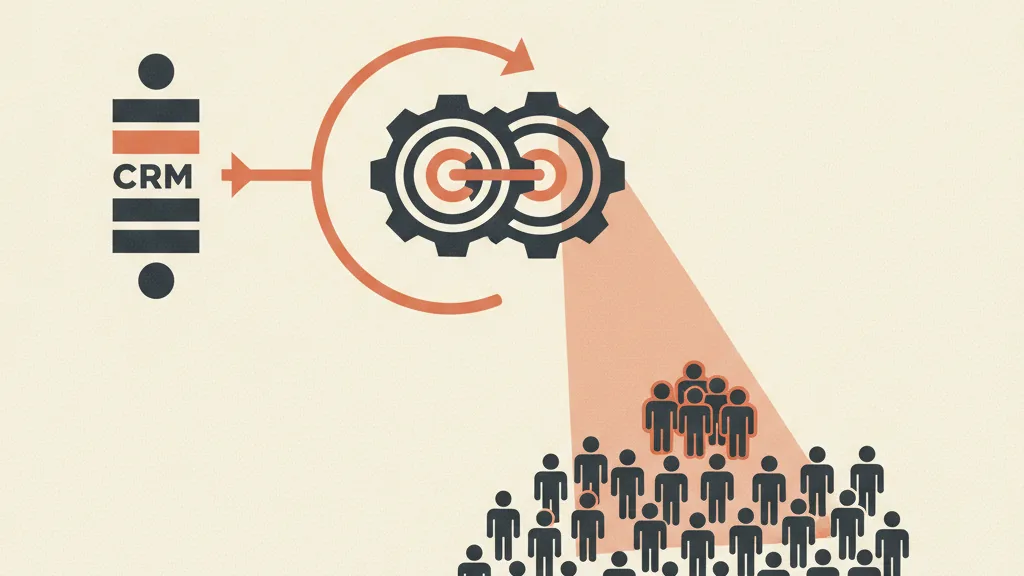
Offline conversions are purchase events or pipeline milestones that don't happen on your website but that you record elsewhere (CRM, management software, point of sale) and then send to Meta, linked to the right person.
The link happens through matching. When a user clicks an ad, Meta already knows some of their data (email, phone, name) in anonymized form. When you send an offline conversion with the same data (the customer's email or phone, hashed), Meta compares them and figures out that this customer came from one of its campaigns. It then attributes the sale to the correct campaign, ad set, and creative.
One technical point worth clarifying: since 2024, Meta has unified tracking under the Conversions API. The old file-upload "Offline Conversions" tool still exists, but the recommended route today is to send offline events through the same Conversions API you use for server-side tracking, tagging them with action_source: physical_store or system_generated. Same concept as before, just on more modern, more reliable infrastructure for the post-privacy era.
The difference from the pixel
The pixel tracks what happens in the browser: visits, add-to-carts, online purchases. Offline conversions track what happens outside the browser: the call that closes the deal, the contract signed in the office, the purchase at the register. They're not in competition, they're complementary. The pixel (and the CAPI) cover the digital funnel; offline conversions close the loop by reporting back the final outcome.
Which events to send: not just the sale
The most common mistake is waiting for the final sale before sending anything. If your sales cycle takes 30 or 60 days, the algorithm stays in the dark for way too long. The fix is to send intermediate events along the pipeline, so Meta gets frequent signals of increasing quality.
A typical mapping for a phone-assisted sales business:
| Offline event | What it signals | When to send it |
|---|---|---|
| Qualified lead | The contact responded and is in target | After the first qualifying call |
| Appointment booked | Concrete interest, pipeline advancement | When the call or visit is booked |
| Quote sent | Deal open, high potential | When the offer is sent |
| Sale (Purchase) | Customer acquired, real value | When the contract closes |
With this structure, you can have campaigns optimize for a reliable intermediate event (for example "Appointment booked," if you have enough volume) and use "Sale" with its economic value for real ROAS analysis. There's one practical rule: optimize for the deepest event that reaches roughly 50 conversions per week per ad set. Below that threshold, the algorithm never exits the learning phase and performance stays shaky.
If you have a long cycle and low volume, qualification becomes central: knowing in advance which contacts are worth sending saves you from polluting the signal. It's worth revisiting how to qualify leads and the logic behind lead scoring, since they're the foundation for deciding which events deserve to end up in Meta.
Conversion value: the real multiplier
Here's the leap in quality that few businesses take advantage of. When you send an offline sale, you can (and should) attach the real economic value of the transaction. Not every customer is worth the same: one closes a €500 contract, another a €5,000 one. If you pass these values to Meta, the algorithm can optimize for value, not just count.
The difference is huge. A campaign optimized for the number of sales treats a €500 customer and a €5,000 customer as identical. A campaign optimized for value understands it should go find more €5,000 customers, even if they cost more to acquire, because the return is higher. For a business with variable ticket sizes, this is the most underrated lever in all of Meta Ads.
One detail to watch: the value you send should reflect your margin or real value, not necessarily the full price. And if you work with recurring customers, factoring in customer lifetime value instead of a single order completely changes who the algorithm goes after.
If your campaign generates leads but your sales team can't close them, the problem is almost always a missing signal to Meta. Request an analysis of your CRM-Meta flow and let's see together where the connection to real sales is breaking down.
How to set it up, step by step
The flow, simplified, looks like this. No magic, just well-connected plumbing.
- Create the offline event set or configure the CAPI. In Meta Events Manager, create a data source for offline events (or use your existing Conversions API dataset). From there you get the dataset ID and an access token.
- Map your CRM events. Decide which pipeline stages become Meta events. Every time a contact reaches that stage, an event should fire.
- Connect the identifying data. Matching requires the contact's email and/or phone number. Meta receives them already hashed (SHA-256), so raw data never leaves your system in plain text, if the integration is built properly. The more fields you send (email, phone, name, city), the higher the match rate.
- Include the click identifier. If you capture the
fbclidparameter (the click ID) when the lead arrives from your funnel and save it in the CRM, matching becomes nearly perfect, because Meta links the person to the exact ad instead of relying only on email and phone. - Automate the sending. Nobody exports CSVs by hand every day. An automated flow (via API or an automation tool like n8n or Make) catches the status change in the CRM and sends the event to Meta in near real time.
- Check the match rate. In Events Manager, monitor the match rate and data freshness. A healthy match rate sits above 50-60%; below 30% there's something to fix in your identifying data.
Step 5 is where most projects get stuck. Connecting the CRM and Meta in a stable way, with a flow that doesn't break the first time a field changes, requires solid architecture. It's the same principle behind a good CRM integrated with the sales funnel: data needs to flow on its own, without manual exports that nobody will actually keep doing every day.
Mistakes that ruin everything
Offline conversions only work if the data is clean and the flow is consistent. Here's where things go wrong most often:
- Low match rate from dirty data. Phone numbers without a country code, misspelled emails, empty fields. If the CRM collects poor-quality data, matching fails and Meta can't link anything. Data quality upstream is everything.
- Attribution window too short. If your sale closes after 40 days but you send the event with a timestamp outside Meta's attribution window, the conversion won't get attributed. Always send the event with the actual conversion date and make sure your cycle fits within the configured window.
- Optimizing for a too-rare event. If you set "Sale" as your goal but only close 8 a month, the algorithm never really learns. Better to optimize for a more frequent intermediate event and save the sale for analysis.
- Double counting. If a purchase is tracked both by the pixel (because it also happens online) and as an offline conversion, it needs deduplicating with a shared
event_id. Otherwise you inflate the numbers and throw off your ROAS. - Forgetting consent. Sending email and phone data to Meta is, to all intents and purposes, data processing. You need a proper legal basis and compliance with privacy rules and Consent Mode. This is sensitive ground, so align with whoever handles consent compliance before turning on the flow.
On that last point: offline conversions are one of the key tools in post-privacy tracking, because they use first-party data (yours, pulled from the CRM) instead of relying on the third-party cookies that are disappearing. It's a structurally more solid direction, but exactly because it touches personal data, it needs to be handled carefully.
What changes in your results (realistic expectations)
Don't expect cost per lead to drop. If anything, it often goes up: the algorithm stops chasing easy leads and starts hunting for people who are harder to acquire but more likely to buy. Raw lead volume can fall by 20-30%.
What should drop is your cost per acquired customer, and what should rise is your real ROAS. The mental shift is crucial: you stop treating cost per lead as your main metric and start looking at cost per sale and value generated. It's the same reasoning behind the Meta Ads KPIs that actually matter: vanity metrics make you feel good, financial ones tell you whether you're actually making money.
In practice, after 3 or 4 weeks of well-fed offline data, a phone-assisted sales business typically sees this: fewer but more qualified leads, a higher close rate on incoming contacts, and an algorithm that finally concentrates budget on the ad sets and creatives that bring in real customers. The sales team's job gets lighter too, since they stop chasing cold contacts.
When it's worth it (and when it isn't)
Offline conversions make sense when these conditions apply:
- The sale closes outside your website (phone, store, call, in-office signature).
- You have a CRM that records outcomes in a structured way (or you're willing to set one up).
- Your average ticket justifies the setup investment: below a certain value per customer, the complexity doesn't pay off.
- You have enough volume to get the algorithm out of the learning phase on at least one pipeline event.
If you sell entirely online with checkout on your site, the pixel plus the Conversions API is all you need — offline conversions won't help you. But if you're doing lead generation for a high-value service and your campaign keeps bringing in contacts your sales team can't close, this is probably the missing piece of your customer acquisition system. Feeding the real sale back into the algorithm is what turns a campaign that "generates leads" into one that generates revenue.
In short
Meta optimizes for whatever you tell it. If you only tell it "this person filled out a form," it will go hunt for people who fill out forms. If you tell it "this person became a €2,000 customer," it will go hunt for people who become customers. Offline conversions are the bridge between your CRM and the algorithm: they get the signal from the register into the machine that decides where your budget ends up.
The setup isn't trivial (clean data, matching, automation, consent), but for anyone selling over the phone or in person, it's the difference between burning budget on the wrong leads and concentrating it on customers who actually pay. This isn't a tinkerer's tweak — it's a shift in the logic of what your advertising is actually optimizing for.
Frequently asked questions
What's the difference between the Meta pixel and offline conversions?
The pixel tracks actions in the browser (visits, online purchases). Offline conversions track outcomes that happen outside your site (a sale over the phone, in-store, or after a call) and report them back to Meta by linking them to the right contact via email or phone. They're complementary: together they close the loop from click to sale.
Do I have to send Meta my customers' personal data?
Yes, but in encrypted form: email and phone are hashed (SHA-256), and the raw data never leaves your system if the integration is built correctly. You still need a valid legal basis and compliance with privacy and consent regulations, which you should verify with whoever handles compliance before turning on the flow.
Will cost per lead go up with offline conversions?
Often yes, and that's entirely normal. The algorithm stops chasing easy leads and looks for people more likely to buy, who cost more to acquire. Lead volume can drop 20-30%, but what matters is cost per acquired customer and real ROAS, both of which should improve.
How many conversions do you need for the optimization to work?
As a practical rule, optimize for the deepest pipeline event that reaches roughly 50 conversions per week per ad set. Below that threshold, the algorithm never exits the learning phase. If the final sale is too rare, optimize for a more frequent intermediate event (like a booked appointment) and use the sale for analysis.
Can I send the economic value of each sale?
Yes, and it's the most underrated lever available. By attaching real value to every sale, Meta can optimize for value instead of conversion count, seeking out more high-ticket customers even if they cost more to acquire. For businesses with variable ticket sizes, this radically changes performance.
Do I need a specific CRM to send offline conversions to Meta?
No, but you need a CRM that records outcomes in a structured way and that can be connected to Meta via API or an automation tool (n8n, Make). What matters is that the flow is automatic: nobody keeps up manual CSV exports consistently, and the signal to Meta ends up breaking down.
Connecting your CRM to Meta reliably is an architecture job, not a click. Talk to us: we can set up your offline conversions flow and get your budget back on customers who actually pay.