Automating Customer Service: From Email to AI Agents
10 min read · AstraLoop Studio
Customer service is the department where automation arrived first and disappointed the most. Anyone running a business has automated at least one piece of it: an auto-reply on email, a contact form, maybe a chatbot with buttons. Yet the info@ inbox stays full and the team keeps answering the same ten questions year after year.
The problem isn't that automation doesn't work. It's that most companies stopped at the first step, the one that's fifteen years old, while the technology underneath changed completely. Today, automating customer service no longer means sending a pre-written email. It means deploying an AI agent that reads the request, understands what the customer wants, checks the systems, and resolves it. On its own, in most cases.
In this article we walk through the whole evolutionary ladder, from early email automations to autonomous conversational agents, with honest numbers at each level and criteria to figure out which rung you're on and where it's worth climbing to. If you need the basics first, start with our customer service guide. Here we go straight to automation.

The four steps of customer service automation
Support automation isn't an on/off switch. It's a ladder. Each rung solves one piece of the problem and opens up the next. It's worth walking through them in order, because almost everyone thinks they're higher up than they actually are.
Step 1: email automations (the rules)
This is the base level: autoresponders and routing rules. "If the subject contains invoice, forward to admin." "If it arrives after hours, send the acknowledgment email." These are static if-then statements: no understanding, just conditions.
They serve exactly one purpose: managing the wait. The customer gets "we've received your request, we'll reply within 24 hours" and knows they haven't vanished into a void. Useful, but it hasn't solved anything. The ticket is still there, in the queue, waiting for a person. The real work is still 100% human.
Step 2: the self-service knowledge base
This is where FAQs, help centers, and tutorials show up. The idea is to let the customer find the answer before they even open a ticket. Done well, self-service cuts down the volume of incoming requests, especially the repetitive ones like "how do I change my password" or "where can I check my order status".
The limitation is that it offloads the effort onto the customer. They have to know they need to search, know where to search, then read and understand. Anyone in a hurry, or not in the mood, skips the knowledge base and writes in anyway. In practice you're only capturing the most patient, self-sufficient customers — who also happen to be the cheapest ones to serve.
Step 3: the rule-based chatbot (the buttons)
The chatbot with preset paths: "Press 1 for orders, 2 for returns, 3 to speak with an agent." It's a knowledge base dressed up as a conversation. It follows a decision tree written by hand by someone on the team.
It works as long as the customer stays inside the rails. The moment they ask for something outside the script — which happens almost every time — the chatbot stalls or bounces everything to a human agent. That's why these bots have such a bad reputation: they don't understand, they just funnel. The gap between this step and the next one is enormous, and it's worth digging into in the difference between a chatbot and an AI agent.
Step 4: the conversational AI agent
This is where everything changes. The AI agent doesn't follow a tree: it reads the request in natural language, understands the intent even if it's poorly written or incomplete, draws on the company's knowledge base, and, most importantly, acts on the systems. It queries the order management platform for shipping status, opens a return, updates an address, issues a voucher. It doesn't tell you what to do — it does it.
And when it needs to, it hands off. A complex case, an angry customer, a request that falls outside its scope: the agent recognizes it's out of its depth and passes the conversation to a person, with all the context already attached. This is what separates a serious agent from a toy, and we cover it in depth in how to manage the handoff to a human agent.
What actually changes between "replying" and "resolving"
The distinction that matters isn't technical, it's about the outcome. The first three steps automate the reply: they get a message delivered, route it, inform. The fourth automates the resolution: it closes the case without a human ever touching the keyboard.
In customer service this difference is measured with one precise metric, the deflection rate (or autonomous resolution rate): the percentage of conversations the AI closes on its own, with no escalation. Here's the realistic order of magnitude for each level, based on typical support volumes for an Italian SMB or e-commerce business in 2026.
| Level | What it automates | Estimated autonomous resolution | Indicative cost |
|---|---|---|---|
| Email automations (rules) | Only the acknowledgment | ~0% | Very low |
| Self-service knowledge base | Repetitive FAQs, self-searchers | 15-25% of volume | Low |
| Rule-based chatbot | Simple preset paths | 20-30% | Low-to-medium |
| Conversational AI agent | Understands, queries systems, acts | 50-70% | Medium, with initial setup |
These percentages are estimates to calibrate case by case: they depend on the quality of the knowledge base, how standardized the processes are, and how well the agent is integrated with your order management and CRM systems. But the order of magnitude holds. You don't get from 25% to 60% by adding more FAQs. You get there by moving from a system that informs to one that operates.
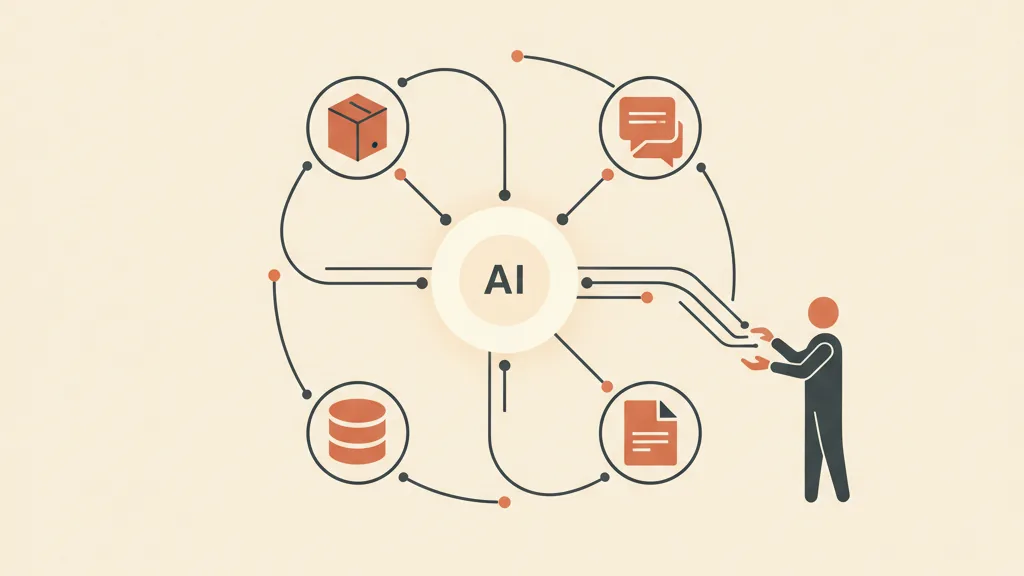
From email to agents: the evolution in practice
How do you actually get to the AI agent? Not by tearing down what you already have, but by layering on top of it. The three pillars that make an agent capable of resolving, not just talking, are these.
1. A knowledge base the AI can actually read
An agent is only as good as the information it can access. A PDF manual isn't enough: you need a structured knowledge base that the AI queries in real time, using the technique known as RAG. That's the engine that lets it answer about your products, your return policies, your shipping times, instead of generic manual-speak. If this topic is new to you, we explain the mechanics in how to build a knowledge base for AI.
2. Integration with your systems (the real dividing line)
An agent that can only read FAQs is still just an elegant chatbot. What turns it into a tool that actually resolves things is the connection to your operational tools: the order management system, the CRM, the shipping platform, the ticketing system. That's where the ability to say "your package is in Bologna, it arrives tomorrow" comes from, or to genuinely open a return. Without these integrations there's no autonomous resolution, only conversation. On a custom-built CRM this dialogue is native; on rigid systems it has to be carefully engineered.
3. Multichannel orchestration
Customers don't only write to you by email. They message you on WhatsApp, in the chat on your site, on social media, sometimes they call. A modern customer service automation doesn't live on a single channel: it orchestrates the same logic across all of them. A request that comes in on WhatsApp and one that comes in by email need to get the same answer, with the same context. WhatsApp in particular has become the dominant support channel in Italy and deserves dedicated attention: we cover it in automating WhatsApp Business with AI.
Put together, these three pieces make the difference between a bot that makes you lose your patience and an agent that solves your problem at 11pm on a Saturday, without ringing anyone's phone. That's the whole point of AI-powered customer service automation: not replacing people, but taking the repetitive work off their plate and leaving them the cases that actually need a human brain.
Want to know how many of your tickets an AI agent could close on its own, and which channel is best to start with? Tell us how you handle support today and we'll show you where the real headroom is.
Where the AI agent is worth it, and where it isn't
Automating everything is as much a mistake as automating nothing. Some requests are practically made for an AI agent, others are where the machine does damage. The practical rule: automate what's high-volume and low-variability, keep human what's rare or emotionally charged.
- Perfect for the AI agent: order status, tracking, address changes, delivery times, standard return handling, password resets, hours and general info, simple upsells, recovering an abandoned cart with a contextual reply.
- Better left to a human (with AI handoff): formal complaints, refund requests outside policy, service failures with already-angry customers, negotiations, legal or privacy cases, anything that requires judgment or real empathy.
The model that works in 2026 isn't "AI only" and isn't "humans only". It's hybrid: the agent takes the first contact and closes everything manageable (that 50-70% of repetitive volume), the human team only gets the cases the AI has filtered through, already enriched with context. The result: response times that collapse, agents who stop doing copy-paste work, and customers who no longer wait in a queue for a trivial question.
The positive side effect: customer service that sells
There's one angle almost nobody exploits. When the AI agent is embedded in support conversations and connected to the CRM, customer service stops being just a cost center and starts generating value. A customer asking about restock timing is a buying signal. Someone writing in about a return is a retention opportunity. The agent can recognize these moments and act on them, feeding your customer retention strategies and even triggering abandoned cart recovery at the right moment. Support becomes a commercial touchpoint, not just an emergency room.
Where to start (without redoing everything)
You don't need a six-month project. The sensible path is incremental.
- Measure where you stand. Look at the last three months of tickets and count: how many are the same ten questions? For an average SMB, it's 60-80%. That's your automation potential, already sitting there, measurable.
- Fix the knowledge base. Before AI even enters the picture, the information needs to exist and be correct. An agent working off a wrong knowledge base makes mistakes faster than a human does.
- Start with one channel and one use case. An agent that handles order status brilliantly on WhatsApp beats one that's mediocre at everything. You expand later, based on real data.
- Design the handoff from day one. Passing to a human isn't the AI failing — it's its single most important function. Define when it triggers and how the context reaches the agent.
- Integrate with the CRM. This is where automated support stops being isolated and becomes part of the system. It's worth understanding how to connect conversation channels to the CRM.
This approach, by the way, is the same as any good AI-driven business process automation: start from a high-volume process, automate it well, measure, expand. Customer service is just the most obvious candidate, because the repetitive volume is enormous and easy to see.
In summary
Customer service automation has moved from sending pre-written emails to resolving tickets autonomously. Most companies are stuck on the first or second rung and keep paying people to answer the same questions. The real leap — the one that takes the autonomous resolution rate from 25% to 60% and beyond — doesn't come from adding more FAQs. It comes from an AI agent that understands, queries your systems, and acts.
The dividing line isn't how smart the model is. It's how well you connect it to your reality: a clean knowledge base, integration with your order management and CRM, orchestration across the channels your customers actually use, and a well-designed human handoff. Get these right and support stops being the department that puts out fires and becomes a system that resolves things — and occasionally sells.
Frequently asked questions
What's the difference between automating customer service via email and using an AI agent?
Email automations are static rules (if-then): they send an acknowledgment or route the message, but they don't resolve anything, the ticket stays in the queue for a person. An AI agent, on the other hand, understands the request in natural language, queries your systems (order management, CRM, shipping) and closes the case on its own — for example by giving the order status or opening a return. The first one replies, the second one resolves.
How many tickets can an AI agent handle on its own for customer service?
On typical support volumes for an SMB or e-commerce business, a well-integrated AI agent autonomously closes between 50% and 70% of conversations, compared to 15-30% for a knowledge base or a button-based chatbot. The percentage depends on the quality of the knowledge base, how standardized the processes are, and the integrations with your systems. These are estimates to calibrate to your specific case, but that's the order of magnitude.
Does an AI agent replace customer service reps?
No, it frees them from repetitive work. The model that works is hybrid: the AI agent handles the high-frequency, low-variability volume (order status, standard returns, info), while reps only get the complex or delicate cases, already enriched with context thanks to the automatic handoff. Complaints, negotiations, and angry customers stay human. Anyone who eliminates people entirely gets lots of replies but few problems that are actually solved.
What does an AI agent need to actually resolve things, not just reply?
Three things. A structured knowledge base that the AI reads in real time (RAG technique), so it answers about your products and policies instead of generic manual-speak. Integration with your operational systems (order management, CRM, shipping), which is what lets it act rather than just talk. And multichannel orchestration, to give the same answer across email, chat, and WhatsApp. Without the connection to your systems, it stays an elegant chatbot.
Which channel is best to start automating support with?
Whichever one customers write to you on most, and in Italy today that's almost always WhatsApp, followed by on-site chat and email. Better to have an agent that handles one case brilliantly on one channel (say, order status on WhatsApp) than one that's mediocre across the board. You start with one channel and one high-volume request type, measure the result, and expand based on real data.
How much does it cost and how long does it take to automate customer service with AI?
You don't need a six-month project. An AI agent for a well-defined use case (like order status or repetitive FAQs) can go into production in a few weeks, with an initial setup cost and then a cost per volume handled, usually lower than paying a person to answer the same questions. Most of the work isn't the AI model — it's fixing the knowledge base and connecting the systems. That's what determines timeline and results.
If you want to move from a customer service that replies to one that resolves — hybrid, and integrated with your CRM — request an analysis: we'll look at your volumes together and tell you what's worth automating first.