Lead Generation with Google Ads: The 6-Step Guide for SMBs
12 min read · AstraLoop Studio
Google Ads intercepts people who are already searching for what you sell. That makes it one of the most direct customer acquisition channels there is: you don't have to interrupt anyone, you show up right when the demand exists. The problem is that most SMBs use it badly. They flip on a "Maximize clicks" campaign, throw a monthly budget at it, get a stream of mediocre contacts, and conclude that "Google Ads doesn't work."
It's not Google Ads that doesn't work. It's the system around it that's missing. A lead coming from a hot search is worth little if the landing page is vague, if you're not tracking the real conversion (the lead, not the click), and if the contact then sits in an inbox for two days without a reply. In this guide you'll find a 6-step framework for building that system: from choosing the right keywords all the way to the automated follow-up that qualifies the contact while it's still hot.
This isn't a "click here, then here" guide. It's the strategic skeleton an owner or marketing manager needs to see where the money is being made and where it's being burned.

First things first: Google Ads is one piece, not the whole system
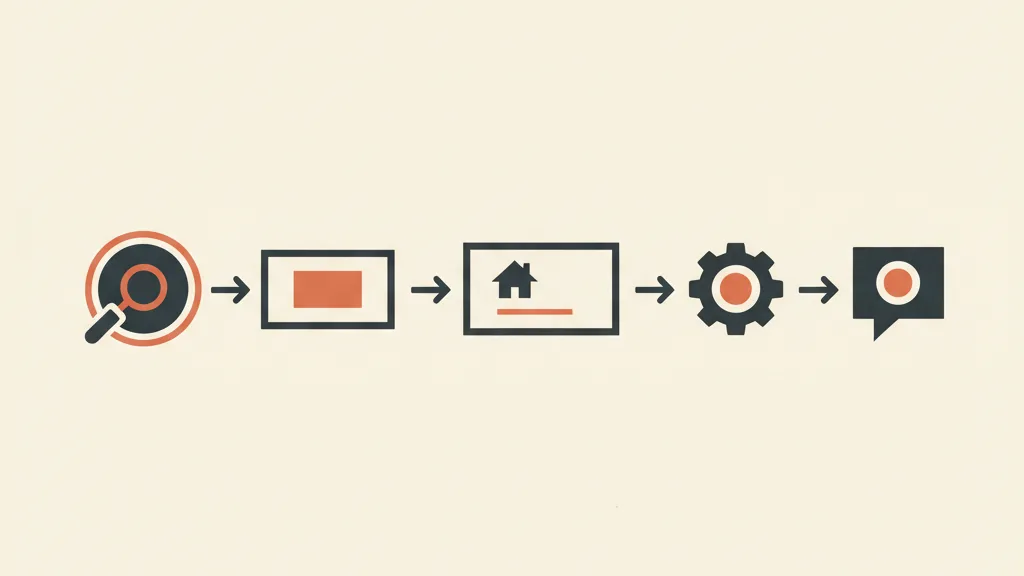
A recurring mistake is treating Google Ads like a machine that spits out customers on its own. It does generate captured demand, sure, but the real value comes from how you handle that demand after the click. The full flow looks like this: the right keyword, a relevant ad, a landing page that converts the visitor into a lead, tracking that tells Google which was a good lead, and follow-up that turns the lead into an appointment or a sale.
If even one link breaks, everything downstream degrades. You can have the perfect ad and still burn budget because the landing page doesn't convince. You can have an excellent landing page and waste it all because nobody calls the contact back. That's why it pays to think of this as a single customer acquisition system rather than a collection of disconnected tactics. Google Ads is the tap; the system is the plumbing behind it.
Keep one principle in mind: your goal isn't the click, it's the qualified lead. Further upstream still, it's the customer. Every decision in the 6 steps below should be made looking at the bottom of the funnel, not at whichever metric is easiest to look at up top.
Step 1 - Keyword research by intent, not by volume
Keyword research for lead generation is different from keyword research for traffic. You don't care about high volume, you care about commercial intent: is whoever is searching that phrase close to buying or requesting a quote? A keyword with 200 searches a month but very high intent (say, "tax advisor sole proprietor Milan") is worth more than one with 10,000 generic searches ("how does a sole proprietorship work").
Sort your keywords into three temperature groups:
- Hot (transactional): contain action verbs or words ("quote", "price", "near me", "request", "buy"). These are the first ones to invest in.
- Warm (comparative): "best", "alternative to", "X vs Y". Whoever is searching is evaluating, but is in a decision-making phase.
- Cold (informational): "how to", "what is", "guide". Great for content and SEO, often too far from the purchase to pay for per click on Google Ads (with exceptions, if you have a strong lead magnet).
On match type: in recent years Google has pushed harder and harder toward broad match combined with smart bidding, and in many cases it works better than the old exact match. But broad match needs guardrails, otherwise Google will show you on off-target searches. The main guardrail is negative keywords.
Negatives are half the job
Building a solid list of negative keywords is even more important than the positive ones. You need to systematically exclude:
- People looking for a job ("salary", "hiring", "resume")
- People looking for free stuff ("free", "no cost", "free download")
- People looking to DIY ("how to do it yourself", "tutorial")
- Purely informational searches that will never turn into a customer
Every euro spent on a search that could never become a customer is wasted twice over: you pay for the click and you pollute the data that smart bidding learns from. Discipline on negatives is one of the fastest ways to stop junk leads before they even come in.
Step 2 - Campaign structure: Search first, PMax after
For an SMB starting from zero on lead generation, the right order is clear: Search first, then Performance Max. Reason: Search is controllable, transparent, and shows you exactly which searches you're showing up on, generating your first clean conversion data. Performance Max is powerful but it's a black box that needs data to work well. Feeding it conversions from an already-seasoned Search campaign gets it off to a much better start.
How to set up Search
Keep the structure simple: few ad groups, thematic and tight. Each group revolves around one precise intent, with 2-3 responsive ads per group testing different angles. You don't need the baroque complexity of old accounts with 200 ad groups: with smart bidding and broad match, overly fragmented groups dilute the conversion signals.
On ad copy: the headline needs to answer the search (relevance = higher Quality Score = lower cost per click) and the description needs to give a reason to click you instead of the competitor. Include a proof point or reassurance (years in business, warranty, service area) and an explicit call to action. Use every asset extension available: sitelinks, callouts, lead forms. The more surface area you occupy on the results page, the less room you leave for competitors.
When to add Performance Max
Once Search is generating stable conversions (roughly after 30-50 tracked conversions), you can open a Performance Max campaign to extend reach to YouTube, Display, Gmail, and Discover. Two essential precautions for lead gen:
- Exclude your brand from PMax. Otherwise the campaign takes credit for conversions that would have happened anyway from people searching for you by name, inflating results. We explain how to do this in detail in the guide on how to exclude brand from Performance Max.
- Use search themes deliberately. Guide the algorithm with relevant search themes instead of leaving it completely free. We go deeper into the mechanism in the article on search themes in PMax.
If you're still unsure how to split budget between the two formats, the guide on Performance Max vs Search goes into the cases where one or the other is the better fit.
Step 3 - The landing page: where the lead is won or lost
You can have the best campaigns in the world: if you send that traffic to your site's homepage, you're throwing money away. The homepage is generic, invites exploration, and scatters attention. Lead generation needs a dedicated landing page, built for one action only: leaving their details.
The rules that actually move the conversion rate:
- Message match: if the ad promised "solar panel quote in 24 hours", the landing page needs to open with exactly that promise. Any mismatch bounces the visitor.
- One single call to action, repeated: no navigation menu leading elsewhere, no five different buttons. One goal, repeated down the page.
- Short form. Every extra field lowers conversion. Ask for the bare minimum needed to follow up and qualify (name, contact, one or two qualifying questions). Collect the rest of the personal details later.
- Social proof above the fold: reviews, numbers, customer logos, guarantees. Anyone arriving from a paid ad is skeptical by definition.
- Speed and mobile. Most traffic comes from smartphones: a slow page means lost leads before the form is even reached.
One detail that's often overlooked: landing page quality directly affects cost. Google factors the landing page experience into Quality Score, so a better landing page doesn't just convert more, it also makes you pay less per click. To go deeper than the basics, the guide on high-converting landing pages covers the elements that make the difference.
Step 4 - Tracking the right conversions (the lead, not the click)
This is the step that separates those who optimize on real data from those who are flying blind. If you tell Google "optimize for clicks", it'll give you clicks. If you tell it "optimize for leads", it'll give you leads. But to do that you need to track the correct conversion, and this is where most SMBs have broken or missing setups.
The bare minimum:
- Define the conversion as a real lead. Form submission, a phone call over a certain duration, a click on WhatsApp. Not a visit to a generic "thank you" page, but the event that actually represents a contact.
- Assign a value to conversions. Even an estimated one. A lead for a big quote is worth more than one for a small service: by giving them different values, smart bidding learns to chase the leads that matter.
- Set up tracking properly. With third-party cookies gradually disappearing, you need robust solutions. It's worth understanding conversion tracking setup and evaluating server-side tracking so you don't lose data.
The real leap forward: offline conversions from your CRM
Here's the point almost no SMB takes advantage of, and it changes everything. A filled-out form is not a customer. Of the leads that come in, some become customers and many don't. If you're only optimizing Google Ads on "form submitted", you're teaching the algorithm to bring you more forms, not more customers. And the two goals don't line up at all.
The solution is offline conversions imported from your CRM: when a lead becomes a customer (or even just a qualified appointment), that data feeds back into Google. That way the algorithm stops chasing "easy forms" and starts looking for people who resemble your real customers. That's where the loop closes between advertising and your CRM. This is the level at which a campaign stops generating traffic and starts generating revenue.
For the full set of metrics to monitor (from CPC to cost per lead to value per conversion), the guide on Google Ads KPIs gives you the complete dashboard.
Want to know whether your Google Ads campaigns are generating customers or just clicks? Request an analysis of your acquisition funnel: we'll look at tracking, landing pages, and follow-up and tell you where the leads are being lost.
Step 5 - Automated follow-up: speed beats everything
You've done everything right: the ad, the landing page, the tracking. The lead comes in. Then what? At most Italian businesses, the contact sits for hours, sometimes days, before anyone calls back. Meanwhile the lead has also filled out two competitors' forms, and whoever responds first usually wins.
The rule is brutal in its simplicity: response speed is the single factor that weighs most heavily on turning a lead into a customer. Responding within a few minutes instead of a few hours can multiply your close rate. This is where automation makes the difference between a stream of leads going to waste and one turning into appointments.
What should trigger the instant a lead fills out the form:
- An immediate confirmation message (email or WhatsApp) that reassures them and keeps the contact warm
- A notification to the salesperson with the lead's details already in hand
- An automated sales follow-up sequence for anyone who doesn't respond right away, without relying on anyone's memory
This is where artificial intelligence has brought a concrete leap forward. An AI agent that qualifies leads via WhatsApp can engage the contact in real time, ask the qualifying questions, work out whether they're a fit, and book the appointment straight onto the calendar, 24 hours a day. The human salesperson only receives leads that are already screened and ready. That way you're not paying for qualified traffic on Google only to lose it in the black hole between the form and the first call.
Step 6 - Optimize in a loop: from data to decisions
Google Ads isn't "set and forget". It's a continuous cycle of reading data and correcting course. But be careful not to fall into the opposite trap: touching everything every day stops smart bidding from learning. You need balance.
The healthy optimization rhythm for an SMB:
- Weekly: check search terms and update the negative keyword list. This is the highest-return activity for the time invested.
- Every 2-3 weeks: assess ad performance, pause the weak ones, test new copy angles.
- Monthly: look at the full picture (cost per lead, close rate by campaign, lead quality from the CRM) and reallocate budget toward what brings in real customers, not just leads.
The compass isn't cost per click, nor, on its own, cost per lead. It's the full chain: how much it costs you to acquire a customer versus how much that customer is worth over time. A channel with a high cost per lead but a very high close rate can be your best investment; one with cheap leads that never close is a disguised money pit. To pin down the right numbers, the guide on acquisition unit economics (CAC, CPL, LTV) gives you the method.
The mistakes we see most often
| Mistake | What happens | Fix |
|---|---|---|
| Optimizing for clicks | Lots of traffic, few leads | Track the lead as the conversion |
| Traffic to the homepage | Very low conversion | Dedicated landing page, one single goal |
| Zero negative keywords | Budget burned on off-target searches | A curated negative list, updated weekly |
| No fast follow-up | Hot leads that go cold | Automated response within minutes |
| Only "form submitted" as the conversion | The algorithm chases easy leads, not customers | Offline conversions from the CRM |
| PMax with brand included | Inflated, misleading results | Exclude brand from PMax |
None of these mistakes needs a bigger budget to fix. It needs a well-designed system. And that's exactly where Google Ads shifts from being a "cost" to being an "acquisition channel". If you're just starting out, our guide on the biggest Google Ads budget wastes is a good companion to this one, and for the bigger strategic picture there's the strategic guide on Google Ads in 2026.
From campaign to acquisition system
If you go back over the 6 steps, there's one single thread: Google Ads works when it stops being an isolated campaign and becomes the first link in a system that runs from the search all the way to the paying customer, with honest tracking and automated follow-up that doesn't let any contact go cold.
The advertising part is the most visible one, but it's often not the part that makes the difference. The difference comes from the three things almost nobody bothers with: tracking the real conversion (the customer, not the click), feeding CRM data back into Google, and responding to leads in real time. Get those three right and the same campaigns, with the same budget, start delivering double. That's the lens we use for the whole topic of customer acquisition: not scattered tactics, but an engine that runs on its own.
Frequently asked questions
How much does a lead cost with Google Ads?
It depends a lot on the industry and the competition on the keywords: it ranges from a few euros in niche local markets to several dozen euros in competitive sectors like legal, finance, or insurance. But the number to watch isn't cost per lead in isolation: it's customer acquisition cost measured against customer lifetime value. A 40-euro lead that closes 30% of the time can be more cost-effective than an 8-euro lead that never closes.
Is Search or Performance Max better for generating leads?
For an SMB starting out, it's better to begin with Search: it's controllable, transparent, and produces the first clean conversion data. Performance Max makes sense as a second step, once you have stable conversions to feed the algorithm, and it should always be set up excluding your brand and guided with search themes. In most cases the two coexist: Search stays the core, PMax extends the reach.
Why are my Google Ads leads low quality?
Almost always for two reasons: you're missing a solid negative keyword list (so you show up on off-target searches), and you're optimizing for clicks or for a plain form submission instead of for the actual customer. The fix is to import offline conversions from your CRM into your tracking, so Google learns to look for people similar to your real customers instead of whoever fills out an easy form.
Should I send Google Ads traffic to my website or to a dedicated landing page?
To a dedicated landing page, always. The homepage is generic and scatters attention, while a landing page built for one single action, with message match to the ad and a short form, converts far better. On top of that, a relevant landing page improves Quality Score and lowers your cost per click.
How long does it take to see results with Google Ads for lead generation?
The first clicks and leads arrive within days, but a reliable read generally takes 4-8 weeks: smart bidding needs to accumulate conversions to learn, and you need data on lead quality (how many actually close) before you can optimize for real. Expecting positive ROI in the first week is the path to making bad decisions on too little data.
Do I need a CRM to do lead generation with Google Ads?
Not to generate the leads, but to make them pay off, yes. A CRM lets you manage and qualify contacts, automate fast follow-up (the factor that weighs most on conversion), and above all feed offline conversions back to Google, i.e. which leads turned into customers. Without that data loop, the algorithm is optimizing in the dark.
If you want to turn Google Ads into a system that brings in customers, not just contacts, let's talk: we build the entire chain, from the campaign to automated AI follow-up, integrated with your CRM.