Offline Conversions in Google Ads: Connect Your CRM to Optimize for Real Customers
9 min read · AstraLoop Studio
There's a problem almost nobody addresses until they've burned through a few thousand euros: Google Ads optimizes for leads, not customers. If you count a form fill or an inbound call as a conversion, you're telling the algorithm "bring me more people who fill out forms." And it obeys. It brings you volume. But volume of what? Often, contacts who never close, who were never really interested, who left their number out of curiosity.
You know the result: reports full of conversions, an empty pipeline. Cost per lead looks great, cost per acquired customer is a disaster. The gap between those two numbers is exactly where the wasted budget hides.
Offline conversions solve exactly this. Instead of telling Google "this lead filled out the form," you tell it "this lead, three weeks later, signed a €4,000 contract." At that point the algorithm stops chasing people who fill out forms and starts hunting for people who look like your real customers. Everything changes.

What is an offline conversion in Google Ads
An offline conversion is a value event that happens after the click, off-site, which you re-import manually (or via automation) into Google Ads. The click on an ad generates a lead. That lead enters your CRM. Then real life happens: sales calls, qualifies, sends a quote, closes or loses. Every step of that journey is an offline conversion you can feed back to Google.
Typical examples, for a services or B2B company:
- Qualified lead (MQL/SQL): the contact has passed the first screening and is a genuine potential customer.
- Quote sent: there's a concrete buying intent.
- Closed sale: the customer signed and paid. This is the conversion that actually matters.
- Sale value: not just "yes, they bought," but "they bought for €4,000." With this data you can optimize for revenue, not just customer count.
The distinction between who fills out a form and who pays isn't a technical detail. It's the difference between an account that looks like it's working and one that actually generates cash. If you're not clear on why tracking conversions is the foundation of every campaign, the rest of this guide won't help you: measurement has to be in order first, optimization comes after.
Why optimizing for leads costs you money
Google's Smart Bidding (Maximize Conversions, target CPA, target ROAS) is powerful but literally dumb: it does exactly what you train it to do. If the signal it receives is "form filled," it optimizes to generate filled forms. And audiences that fill out forms easily aren't necessarily the audiences that buy.
Let's run through it with real numbers. Picture two search groups / keyword sets:
| Signal used | Group A | Group B |
|---|---|---|
| Leads generated | 100 | 40 |
| Cost per lead | €25 | €60 |
| Leads that close | 5 (5%) | 12 (30%) |
| Cost per real customer | €500 | €200 |
If you optimize for leads, Google loves Group A: cheaper per lead, produces more of them. It shifts budget there and cuts Group B. But Group B is the one generating customers at half the cost. By optimizing for the wrong signal, the algorithm actively works against you, and the more budget you give it, the more the problem compounds. This is one of the sneakiest ways money gets wasted in Google Ads: not through visible mistakes, but through optimization aimed with surgical precision in the wrong direction.
The problem gets worse with lead generation campaigns, where weeks can pass between the click and the customer. It's the same reason lead quality matters more than quantity: without feedback from the close, Google has no way to tell a gold-mine contact from junk.
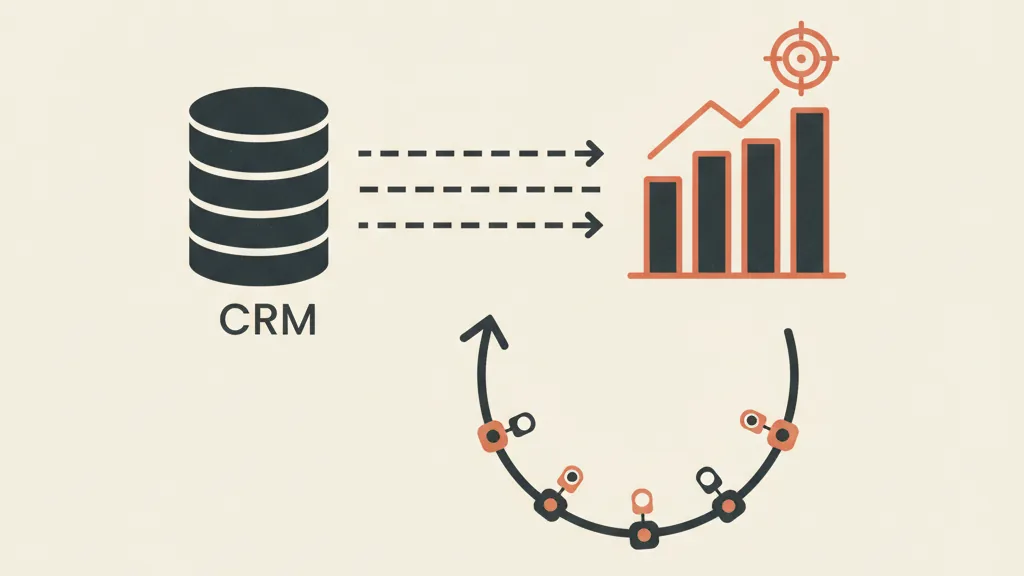
How the CRM → Google Ads connection works
The mechanism that makes all this possible is an identifier: the GCLID (Google Click Identifier). When a user clicks your ad, Google appends a unique parameter to the URL, the gclid. It's the fingerprint of that specific click.
The logical chain looks like this:
- Capture the GCLID on the landing page. A script reads the parameter from the URL and saves it in a hidden form field. This requires auto-tagging to be active in your Google Ads account (it is by default).
- Save the GCLID in the CRM alongside the lead. Every contact carries the "ticket" of the click that generated it.
- Update the CRM status as the lead progresses: qualified, quoted, closed, with its associated value.
- Re-import the event into Google Ads, linking it to the GCLID, the conversion date, and the value. Google reconnects that event to the original click and to the campaign, ad group, and keyword that produced it.
There are three technical ways to do the import:
- Manual file upload: export a spreadsheet with gclid, conversion name, date, and value, and upload it to Google Ads. Simple, but requires discipline and doesn't scale.
- Import via Google Sheets or a platform: a connected sheet that Google reads periodically. A step up from manual.
- API automation: the CRM sends conversions to Google Ads in real time every time a lead changes status. This is the approach we recommend, because it removes human error and delay. This kind of integration is the core of a CRM connected to the sales funnel, where data flows without manual intervention.
Enhanced Conversions for Leads: the alternative without a GCLID
For a few years now Google has offered Enhanced Conversions for Leads, a method that doesn't depend on the GCLID but on contact data (email or phone, sent hashed and encrypted for privacy). Google matches the hashed lead data against the logged-in user who clicked the ad.
The practical advantage is huge: you don't need to propagate and store the gclid through the entire chain, you just need the email or phone number the lead leaves you anyway. It's more resilient to cookie-consent issues and simpler to maintain. To go deeper on how enhanced conversions work, it's worth reading the dedicated guide: for now, know that for most services businesses today, this is the method we recommend implementing first.
Step-by-step setup (no unnecessary jargon)
Here's the operational order we follow when we set this system up for a client.
- Check auto-tagging in Google Ads (Account Settings). It must be active so the gclid reaches your landing pages.
- Define your offline conversion actions in Google Ads: create a "Qualified Lead" conversion, a "Closed Sale" conversion, assigning category and value. Decide which one to use as the primary signal for Smart Bidding.
- Capture the identifier (gclid or contact data) on every form. A good setup does this automatically on all lead generation landing pages.
- Map your CRM statuses: define which stages of your funnel correspond to which Google conversions. You don't need to feed back every micro-step, two or three well-chosen events are enough.
- Set up the import flow: manual at first if you want to validate the concept, via API once you're doing this for real.
- Wait for the data and then change your bidding strategy. This is the point almost everyone gets wrong.
Want to know how many of your Google Ads leads actually become paying customers? Request a tracking audit: we'll connect your CRM and get your campaigns optimizing for revenue, not form fills.
Watch the timing: the conversion window
The trickiest part of offline conversions is latency. Between the click and the closed sale, 30, 60, even 90 days can pass. If your sales cycle is long, the algorithm receives the "good" signal (the sale) weeks after the click.
Two practical consequences:
- Don't switch to Smart Bidding on the sale right away. You need a minimum volume of offline conversions within the attribution window (roughly 30 sales in 30 days per campaign group) for the algorithm to have enough data. With long cycles, that volume is hard to reach.
- Use an intermediate conversion as a proxy. If the sale arrives at 60 days but "qualified lead" arrives in 3 days and is a good predictor, optimize for that instead. It's a smart compromise: much closer to the real customer than a plain "form filled," but with manageable volume and timing.
There's also the matter of how Google attributes conversions by date: an event imported today but tied to a click from a month ago gets reported back to the date of the click. This makes historical reports "alive" (they change over time), and it needs to be explained clearly to whoever reads the numbers, otherwise it looks like past data is changing on its own.
What actually changes after you turn it on
Once offline conversions have been running for a few weeks and you've moved Smart Bidding to the right signal, the changes we see most often are:
- Cost per lead goes up, cost per customer goes down. It's counterintuitive but correct: Google stops chasing easy leads and starts hunting for leads that convert. You pay more per lead, but you close far more of them.
- Keywords and audiences reshuffle. Terms that looked great (lots of cheap leads) turn out to close terribly and get cut; others, previously overlooked, emerge as true customer goldmines.
- Attribution becomes honest. You can finally connect ad spend to real revenue, not to an intermediate event. This changes budget conversations: no longer "how much am I spending per lead" but "how much does every euro invested return." On this front, thinking about CAC, CPL, and LTV finally becomes grounded in real data.
It's not magic and it's not instant. You need a CRM that tracks statuses cleanly, a reliable data flow, and the patience to let the algorithm learn. But it's the difference between running ads and building a customer acquisition system that optimizes itself toward revenue.
The most common mistakes
- Only feeding back "closed sale" with a long cycle: the algorithm starves for data and never optimizes. Use an intermediate proxy instead.
- Losing the gclid between landing page and CRM: if the script doesn't save the identifier, the import fails silently. This needs to be tested end to end.
- Never actually switching Smart Bidding to the new signal: you import the offline conversions but keep optimizing for forms. Half the work, none of the benefit.
- Ignoring consent: Enhanced Conversions require user consent. With Consent Mode v2 misconfigured, no data goes through. Measurement always has to be aligned with privacy before you scale.
Connecting your CRM to Google Ads for offline conversions isn't a technical vanity project for tinkerers. It's the step that turns advertising from a cost center with vanity metrics into a measurable, revenue-driven acquisition engine. If you're spending on Google Ads and still optimizing for filled-out forms, you're leaving on the table the single most important piece of data you already own: which of your leads actually becomes a customer.
Frequently asked questions
What's the difference between an online and an offline conversion in Google Ads?
An online conversion happens on your site right after the click (form submitted, phone call, e-commerce purchase). An offline conversion happens later, off-site, and you re-import it manually or via API: typically a lead qualified by sales, or a closed sale logged in the CRM. The latter tells Google which contacts actually became real customers.
What is the GCLID and why does it matter for offline conversions?
The GCLID (Google Click Identifier) is a unique parameter Google appends to the URL when a user clicks your ad. If you capture it on the landing page and save it in the CRM alongside the lead, you can later re-import the sale tied to that gclid: Google links it back to the exact campaign and keyword that generated it.
Do I have to use the GCLID, or can I use email and phone instead?
You can use Enhanced Conversions for Leads, which match on contact data (email or phone) sent in hashed form, without needing to propagate the gclid through the whole chain. For most services businesses today, this is the simplest and most robust method, and it's less exposed to cookie-consent issues.
How many conversions does Smart Bidding need before it can optimize for sales?
As a practical benchmark, you need at least around thirty conversions in thirty days per campaign group. With long sales cycles, reaching that on closed sales alone is difficult: in that case it's better to optimize for an intermediate conversion (like a qualified lead) that's a good predictor but arrives faster.
Does cost per lead go up with offline conversions?
Often, yes, and that's a good sign. Google stops chasing cheap, easy leads that never close and starts hunting for leads that look like your real customers. You pay more per individual lead, but convert far more of them, so cost per acquired customer, the metric that actually matters, usually goes down.
Do offline conversions work for e-commerce too, or only for lead generation?
They deliver the most value in lead generation and B2B services, where time and people separate the click from the sale. For pure e-commerce the conversion is already online, but offline conversions are still useful for post-purchase events like returns, true margin value, or customers who become recurring.
If you're spending on Google Ads without connecting your CRM, you're optimizing blind. Talk to us: we'll set up offline conversions and turn your customer data into an edge on your campaigns.