AI Email Personalization: Beyond [First Name] in the Subject Line
9 min read · AstraLoop Studio
"Hi [First Name]" in the subject line stopped working a long time ago. In 2010 it felt like a small trick; today it's so common that the brain filters it out as noise, right alongside "Last day!" and "Just for you." If your idea of email personalization stops at the merge tag, you're doing exactly what everyone else is doing, which means you're not personalizing anything: you're just pasting a database field into a string of text.
Real personalization isn't about swapping one word. It's about changing the content, the offer, and the timing based on who's actually on the other end at that exact moment: what they looked at, what they bought, what they ignored, where they sit in their customer lifecycle. This is where two levers come in that, until a couple of years ago, were reserved for companies with an in-house data team: behavioral data and generative AI. Together, they let you write emails that feel written one at a time, without writing them one at a time. In this guide we'll walk through how, with concrete examples and the limits you need to know before you start.
Why the merge tag is done (and what replaces it)
The classic merge tag personalizes a static attribute: name, city, company. The problem is that this data tells you who the person is on paper, not what they want right now. Two customers who are both named Mike and both live in Chicago can have opposite needs: one just bought, the other has had an item sitting in their cart for three days. Treating both with the same "personalized with their name" email is a waste.
Modern personalization works on three levels, in increasing order of value:
- Static attributes (name, role, industry): useful for tone, nearly useless for relevance. This is the merge-tag level.
- Behavioral data (pages viewed, products added to cart, emails opened, downloads, time since last purchase): tells you what the person is interested in right now. This is where the game is won.
- User-declared data (preferences, goals, sizes, budget collected through a quiz or a preference center): the cleanest signal there is, because they told you themselves.
These last two data types have precise names. The behavioral data you collect on your own channels is first-party data, the most valuable fuel in post-cookie marketing. What the customer volunteers directly is zero-party data, and it's worth even more because it requires no interpretation. A clothing e-commerce store that knows your size because you told it in a quiz doesn't have to guess from your past purchases: it just sends you things that fit.
The leap: from static segmentation to dynamic personalization
Many companies confuse segmentation with personalization. Segmentation splits the list into groups ("active customers," "dormant," "high value") and sends each group a different email. It's a great first step, and if you're not doing it yet, that's where you should start: you'll find the basics in customer database segmentation.
Dynamic personalization goes further: inside the same email, different content blocks appear to different people based on their data, at the moment they open it. You're not creating 40 emails for 40 segments. You create one, with conditional rules and swappable blocks, and the system assembles the right version for each recipient. It's the difference between photographing 40 people one at a time and holding up a mirror that shows each person their own reflection.
Behavioral data: what to collect and how to use it
Before we get to AI, you need the raw material. Generative AI without behavioral data produces emails that look nice but say nothing: good form, zero relevance. Here are the behavioral signals worth the most, and the practical use you get out of each one.
| Behavioral signal | What it tells you | Email it triggers |
|---|---|---|
| Product viewed but not purchased | High interest, hesitation | Follow-up with reviews + a response to the typical objection |
| Abandoned cart | Strong intent, practical obstacle | Recovery email featuring the same product, addressing the obstacle (shipping, size) |
| Category purchased recently | Timing and taste are known | Coherent cross-sell, not the item just bought |
| No open in over 60 days | Disengagement underway | Reactivation sequence, not an aggressive promo |
| Click on a specific topic | Content preference | Content and offers aligned with that topic |
The key point: every email should start from a behavior, not a calendar. The newsletter sent "because it's Thursday" is the opposite of personalization. Emails that actually convert are triggered by an action (or a lack of one) from the contact. In the trade these are called trigger emails, and they're the backbone of any AI-built lead nurturing system.
The abandoned cart is the most profitable example and the easiest to set up: it's an unmistakable behavior (I wanted to buy, then I stopped) and it recovers sales you'd otherwise lose. You'll find the step-by-step setup in abandoned cart recovery automation.
Where generative AI actually fits in
Let's clear up a common misconception. Generative AI in email marketing isn't (just) about "writing the email for you." Use it that way and you get mediocre copy that sounds the same as everyone else's, and that readers spot from a mile away. The real value is different: generating content variants tailored to each segment, or even to each individual contact, at a scale that would be impossible by hand.
Here are the three uses that actually move the needle.
1. Copy adapted to each contact's context
Picture 12 behavioral segments. Hand-writing 12 versions of the subject line, preview text, and opening paragraph, consistent with each other and with the brand's tone, is half a day's work. A model trained on your brand voice produces them in minutes, keeping the same tone but shifting the angle for each group. There's only one condition for this to work, and it's non-negotiable: the model has to know your voice. A generic AI writes in generic-AI-speak. We explain how to train a model to write like you in training AI on your brand voice.
2. Dynamic blocks generated from product data
In an e-commerce store, AI can write a persuasive micro-description for the specific product a given contact looked at, instead of the generic catalog copy. The same cart-recovery email shows each person a different paragraph, built around the product they left behind and the benefit most relevant to them. It's not a merge tag with the product name dropped in: it's fresh sales copy for every case.
3. Behavioral summaries in natural language
Here AI does something merge tags will never be able to do: it reads a contact's history (bought X, then browsed Y, ignored the last three promos) and distills it into a communication angle. "This customer only buys on sale" or "this one only opens content emails, never offer emails" become operating instructions that shape what you send them. It's the shift from rule-based personalization to personalization based on genuinely understanding behavior.
One detail makes the difference between an email that "reads as AI" and one that reads as human-written: controlled imperfection and consistency. We dedicated an entire piece to this, how to make emails more human with AI, because the number-one risk of automated personalization is producing polished, cold messages that achieve the opposite effect.
Want emails that speak to every customer differently, automatically, instead of the same newsletter for everyone? Tell us how you handle your data and sequences today, and we'll tell you where to start.
The engine underneath: why personalization stalls without a CRM
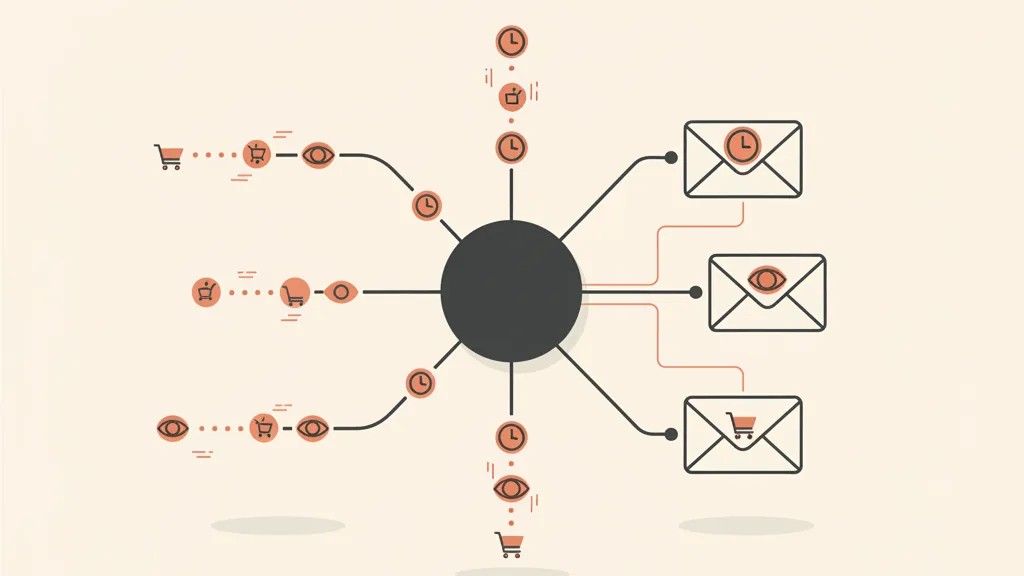
All of this works under one condition: behavioral data has to live in a single place, linked to the right person, updated in real time. If purchase history sits in your order management system, email opens sit in your sending platform, and on-site behavior sits in yet another tool, dynamic personalization never gets off the ground: there's no single profile to pull from.
The heart of a personalized email marketing system isn't the sending platform, it's the database feeding it. A CRM built around your processes ties together contact details, purchases, behavior, and funnel stage, and becomes the source every email draws on to decide what to show. That's the difference between "sending campaigns" and having a system that talks to each contact differently, automatically.
This is also where multichannel orchestration comes from. The same logic that personalizes the email personalizes the WhatsApp message and the follow-up sequence: if a contact doesn't open two recovery emails, the system can escalate to a more direct channel. You build this kind of flow with AI-powered WhatsApp Business automation, and it turns email from an isolated channel into one piece of a coordinated journey. The full picture, with every piece fitting together, is the subject of our pillar guide on marketing automation and how AI is changing it.
How to start without making a mess: the 4 levels, in order
Advanced personalization is tempting, but starting at the wrong level is the surest way to burn time. Here's the sensible order.
- Get your data in order. A single customer profile, with purchase history and behavior linked together. Without this, everything else is just theory. If your data is scattered across five tools, this is job one.
- Turn on the highest-return trigger emails. Abandoned cart, welcome, reactivation. A handful of behavioral automations are worth more than ten newsletters. The welcome flow is often the one with the highest ROI.
- Introduce dynamic content by segment. Conditional blocks that change based on behavior, inside the same email. This is where you start personalizing for real.
- Add generative AI wherever you need scale. Copy variants for many segments, product micro-descriptions, tailored angles. Only after you've trained the model on your voice.
And at every step, measure. Personalization isn't an act of faith: it gets verified. Test the personalized version against the generic one on a sample, and look at clicks and conversions, not just opens (which, with Apple Mail Privacy Protection, are now an inflated metric). You'll find how to set up a clean test and read the numbers without fooling yourself in the guide to A/B testing in email marketing.
The mistakes that undo personalization
Three recurring traps, all avoidable.
- Personalizing the form, not the substance. A thousand subject line variants but the exact same offer for everyone. Readers can tell the difference between "they know me" and "they just changed the greeting."
- Dirty or stale data. Personalizing around a six-month-old behavior ("you looked at running shoes") when the person has since bought something completely different produces the unsettling effect of a system that's spying on you badly. Better not to personalize than to personalize on stale data.
- AI uncanny-valley effect. Copy that's too polished, too many exclamation points, that "enthusiastic assistant" tone that screams automation. Personalization should bring you closer to the reader, not make them feel like they're talking to a well-mannered robot.
The underlying rule is simple: personalization isn't a feature you tick off in a platform, it's a consequence of how well you know your customers and how cleanly you organize that knowledge. The technologies (behavioral data, generative AI, dynamic content) are the multiplier. But if the number you're multiplying is close to zero, the result stays close to zero.
In short
Moving past "[First Name] in the subject line" doesn't mean chasing every new trend. It means shifting the center of gravity: from static attributes to behaviors, from calendar-based campaigns to action-triggered emails, from merge tags to content that genuinely changes for each person. Generative AI comes in at the end, not the beginning, and its job is to scale a personalization you've already built on the right data. Done in this order, email stops being a megaphone and becomes a one-to-one conversation, multiplied across your entire list.
Frequently asked questions
What's the difference between segmentation and email personalization?
Segmentation splits your list into groups and sends each group a different email. Dynamic personalization changes the content inside the same email based on each contact's data, at the moment they open it. Segmentation is the first step; dynamic personalization is the next level.
Do you need AI to personalize emails?
No. You can get great results with behavioral data and rule-based dynamic content, no generative AI required. AI comes in when you need scale: producing copy variants for many segments or product micro-descriptions for every contact, which would be impossible by hand. It's a multiplier, not a prerequisite.
Which behavioral data is most useful for personalization?
The most profitable are abandoned cart, product viewed but not purchased, category purchased recently, time since last open, and clicks on specific topics. Each one triggers a different email. This is first-party data, the most valuable kind in post-cookie marketing because you collect it yourself, on your own channels.
Why do AI-personalized emails sometimes feel fake?
Because the AI wasn't trained on your brand voice, so it produces copy that's too polished, with an overly enthusiastic assistant tone and too many exclamation points. The result is the opposite of personalization: the reader senses a robot. The fix is training the model on your actual copy and keeping the tone consistent.
Can you personalize emails without a CRM?
Only in a limited way. Without a single database linking contact details, purchases, and behavior to the same person, dynamic personalization has nothing to draw on. The sending platform executes, but the CRM is the data source. With data scattered across different tools, there's no single profile, and personalization stops at the merge tag.
Where's the best place to start with email personalization?
In this order: get your data into a single customer profile, turn on the highest-return trigger emails (abandoned cart, welcome, reactivation), introduce dynamic content by segment, and only at the end add generative AI where you need scale. Starting with AI before your data is in order is the most common mistake.
If you want to turn your list from a megaphone into a one-to-one conversation, with behavioral data and AI connected to your CRM, talk to us and request an assessment of your email marketing system.