Google Shopping and Performance Max for Ecommerce: The 2026 ROAS Guide
9 min read · AstraLoop Studio
Why on Google Shopping the channel matters less than the catalog
If you sell products online, Google Shopping and Performance Max are probably the biggest line item in your ad account. They're also where the most money quietly goes to waste, because the system is almost entirely automated and you don't see the keywords eating your budget. You don't type the ads: Google pulls from your product feed and decides what to show, to whom, and at what bid.
That changes the rules of the game. On a classic Search campaign you optimize keywords, copy, and bids. On Shopping and ecommerce, 80% of the result depends on three things almost nobody takes care of enough: product feed quality, catalog segmentation, and the priority you give the right products. The algorithm can only optimize what you feed it. A sloppy feed means a sloppy ROAS, no matter how good you are at bidding.
In this guide we'll cover how to structure Shopping and Performance Max for an ecommerce store in 2026: from the feed to segmentation, from choosing between the two campaign types to using your CRM data to give automation an edge your competitors don't have. This is a deep-dive from our broader guide on how to set up a Google Ads strategy in 2026.

The product feed: where ROAS is born (or dies)
The feed is the file that describes every product to Google Merchant Center: title, description, price, availability, image, category, GTIN, and various attributes. Performance Max and Shopping don't "read" your site the way a human would: they read the feed. If the feed is inaccurate, the algorithm matches your products to the wrong searches and pays for clicks that don't convert.
We have an article dedicated entirely to this, optimizing your product feed on Merchant Center, but here are the points that actually move ROAS.
The product title is your keyword
On Shopping you don't pick keywords: you suggest them by writing the title. Google largely decides which searches to show you on based on the product title. So structure matters:
- Brand + Type + Key attribute + Color/Size + Gender/Model. Example: "Nike Air Zoom Pegasus 41 Men's Running Shoes Black Size 10" beats "Pegasus 41" hands down.
- Put the most important information in the first 70 characters: that's the visible, most heavily weighted part.
- Include the terms customers actually search for, not your internal system's jargon.
- Avoid excessive capitalization, emojis, and promotional claims ("BEST PRICE"): Google demotes or rejects them.
Attributes the algorithm uses to match
| Attribute | Why it matters |
|---|---|
| GTIN / MPN | Google recognizes the exact product and shows it on high-intent searches. Products without a GTIN are often penalized. |
| google_product_category | Determines which universe of searches you land in. Wrong category means wrong traffic. |
| product_type | Your own categorization system: essential for segmenting campaigns (we'll get to that). |
| custom_label_0-4 | Free-form labels. They're the secret weapon for segmenting by margin, seasonality, and best sellers. |
| Image | Clean background, product clearly visible, no watermarks or overlaid text: images with text get rejected. |
Price and availability always in sync
A mismatch between the price in the feed and the price on your site is the number one cause of product disapproval. If the feed says €49.90 and the product page says €44.90, Google suspends the product. Update the feed at least once a day (ideally in real time via API or a sync app). If you use Shopify, our guide to Shopify tracking with GA4 also helps you keep the conversion data that feeds automated bidding aligned.
Custom labels: the secret to segmentation
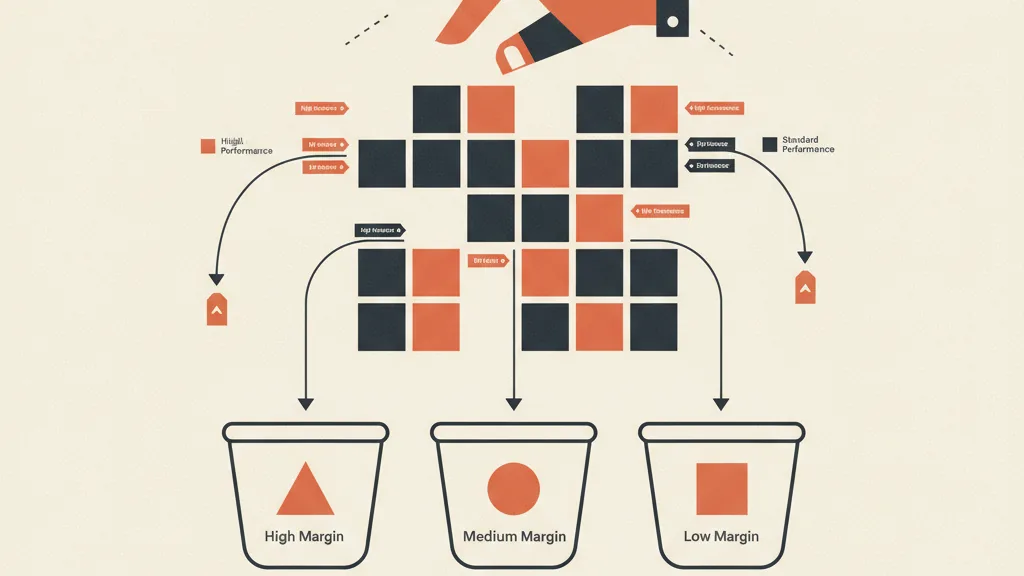
This is where the difference lies between an ecommerce store that scales and one that burns budget. By default, Google treats every product the same: same bid, same priority. But you know perfectly well that not all products are equal. Some carry 60% margin, others 12%. Some are best sellers, others are dead stock.
Custom labels let you tell the algorithm (and yourself, when analyzing performance) which products are actually worth it. Here's how well-run ecommerce stores use them:
- custom_label_0 = margin tier (high / medium / low). Lets you push budget toward products that actually make you money, not just the ones that sell the most.
- custom_label_1 = performance (best seller / average / slow). Separates your workhorses from products still being tested.
- custom_label_2 = price tier (budget / mid-range / premium). Useful for differentiating target bids: a €200 product can tolerate a higher CPA than a €20 one.
- custom_label_3 = seasonality (summer / winter / evergreen / sale). Turn product groups on and off depending on the time of year.
- custom_label_4 = absolute margin or stock status (low stock / overstock).
With these labels you build separate campaigns or asset groups and assign different ROAS targets. A high-margin product can sustain a tROAS of 3, while a low-margin one needs 8 to be profitable. Treating them the same is like driving with only one foot on the pedals.
Standard Shopping or Performance Max? The choice in 2026
For a few years now Google has been pushing hard toward Performance Max, which absorbs Shopping and distributes ads across Search, Display, YouTube, Gmail, Discover, and Maps through a single campaign built on the feed plus creative assets. Standard Shopping campaigns still exist, but the weight has shifted. Here's how to think about it.
| Aspect | Standard Shopping | Performance Max |
|---|---|---|
| Control | High (see queries, manage bids) | Low (black box, Google optimizes) |
| Channel coverage | Shopping/Search network only | All Google channels |
| Data transparency | Good | Limited (improved but still partial) |
| Best for | Those who want surgical control and have low volumes | Ecommerce stores with a large catalog and solid conversion data |
| Main risk | Limited coverage | Brand cannibalization, invisible waste |
Our practical position for 2026: Performance Max is the main workhorse for most ecommerce stores, but it needs to be reined in. Left alone, it tends to pocket the easy conversions (brand, remarketing) and take the credit. If you want to fully understand the operational difference, we've written a dedicated comparison: Performance Max or Search, which to choose and a complete guide to Performance Max.
The brand cannibalization problem
Left unchecked, Performance Max captures searches from people who were already looking for your brand (conversions you'd have gotten anyway) and inflates your apparent ROAS. To avoid this:
- Exclude brand traffic from PMax. You can request brand keyword exclusions from Google or run a separate brand Search campaign. We cover this in detail in how to exclude brand from Performance Max.
- Keep a dedicated brand campaign to capture your own branded searches at low cost with clean data.
- Always look at incremental ROAS, not the ROAS the platform reports.
Recommended structure for an ecommerce store in 2026
There's no single universal structure, but this setup works well for most catalogs:
- "Best seller / high margin" PMax campaign with an ambitious tROAS and priority budget. Contains only products with the custom label that identifies your workhorses.
- "General catalog" PMax campaign with a more conservative tROAS, to keep the rest of the catalog moving and find new winners.
- "Test / new products" PMax or Shopping campaign with a small budget and lower target, to gather data on products with no history yet.
- Dedicated brand Search campaign, kept separate, to capture branded searches at low cost.
Custom-label segmentation is what makes this structure possible: without labels you can't split products into campaigns with different targets. That's why the feed work always comes before the bidding.
Search themes and audience signals
In Performance Max you don't choose keywords, but you can give the algorithm search themes and audience signals to steer it early on, when it has little data. These are hints, not constraints, but they shorten the learning period. We go deeper in how to use search themes in PMax. The most powerful signal, though, is something else: your first-party data.
Want to know if your product feed and Shopping structure are leaving margin on the table? Request an audit of your account: we'll show you where budget is being wasted and how to connect your CRM data to automated bidding.
The AI advantage: feed the algorithm data your competitors don't have
In 2026 Google Ads is almost entirely driven by smart bidding and automation. That means something uncomfortable: if everyone uses the same algorithm, the difference no longer comes from "knowing how to use the platform," but from the quality of the data you feed it. And that's exactly where most ecommerce stores leave money on the table.
Google's automated bidding optimizes for the conversion value you report to it. If all you tell it is "sale = €49 in revenue," it optimizes for revenue. But you don't want revenue: you want margin and customers who buy again. Here are the three levers that actually move real ROAS:
- Conversion values based on margin, not revenue. Pass Google the actual margin of every order (via custom label or dynamic value). The algorithm stops pushing products that sell well but don't make money.
- Offline conversions from your CRM. If you import real customer lifetime value into Google Ads (returns excluded, repeat orders included), bidding stops optimizing for the first purchase and starts optimizing for the right customer. See how to connect offline conversions from your CRM and our guide to enhanced conversions.
- First-party data and customer lists. With third-party cookies going away, your own data is worth more than ever. Feeding PMax signals based on real customers improves both targeting and ROAS. We go deeper in first-party data strategy for Google Ads.
Here's the AstraLoop point: the creative work and bid optimization are now largely handled by the machine. The valuable human work has shifted upstream, to data and automation: keeping the feed spotless, calculating margin per product, syncing the CRM with Google Ads in real time, updating labels based on stock. These are repetitive, high-impact tasks — exactly the kind of work worth automating. If you want to see how to apply AI upstream of your store, check out our AI use cases for ecommerce and our article on AI automation for ecommerce.
Metrics: watch the right ROAS
Last point, but one of the most important. The ROAS Google Ads shows you is an inflated, last-click ROAS: it includes brand conversions and ignores returns, margins, and repeat purchases. The metrics that really matter for an ecommerce store are different.
| Metric | What it tells you |
|---|---|
| Platform ROAS | Useful for optimizing, but tends to overstate results |
| MER (Marketing Efficiency Ratio) | Total revenue divided by total ad spend: the true picture of the account |
| Margin-based ROAS (POAS) | Return calculated on profit, not revenue: the metric you should actually watch |
| CAC vs LTV | How much it costs to acquire a customer versus what they're worth over time |
We have a dedicated article comparing MER and ROAS and one on ecommerce KPIs to track. The key idea: optimize for numbers that reflect real profit, otherwise you're watching a ROAS climb that doesn't exist in your bank account.
In summary
Google Shopping and Performance Max for an ecommerce store in 2026 are won upstream, not in the campaign dashboard. A feed polished down to the last detail, a catalog segmented by margin and performance with custom labels, a campaign structure that separates your workhorses from the rest, and above all first-party data (margins, CRM, first-party) fed into the algorithm. Automation does the rest of the work, but only if you give it quality material. Whoever takes care of these fundamentals has a structural edge over anyone who just nudges budgets up and down.
Frequently asked questions
Is standard Google Shopping or Performance Max better for an ecommerce store?
For most ecommerce stores with a large catalog and solid conversion data, Performance Max is the main choice because it covers every Google channel. Standard Shopping is still useful if you want surgical control over bids and queries, or if you have low volumes. Either way, exclude brand traffic so you don't inflate ROAS.
What are custom labels and why do they matter?
They're free-form labels you add to the product feed (custom_label_0 through 4) to classify products by margin, performance, price tier, or seasonality. They let you segment campaigns and assign different ROAS targets to different products, instead of treating your whole catalog the same way.
Why are my products getting disapproved on Google Merchant Center?
The most common causes are a mismatch between the price or availability in the feed and on the site, images with text or watermarks, missing GTINs, and wrong product categories. Sync your feed at least once a day, ideally in real time, to avoid suspensions from outdated pricing.
How do you write a good product title for Google Shopping?
Follow the structure Brand + Type + Key attribute + Color/Size + Model, putting the most-searched information in the first 70 characters. Use the terms customers actually search for, not your internal system's jargon. Avoid excessive capitalization, emojis, and promotional claims, which Google demotes or rejects.
How can I get more out of Performance Max?
Feed the algorithm quality data: conversion values based on margin rather than revenue, offline conversions imported from your CRM, and first-party signals from customer lists. Exclude brand to measure real incremental ROAS, and use search themes to steer the initial learning phase.
Which ROAS should I actually look at to know if campaigns are working?
The ROAS Google shows tends to overstate results because it includes brand and ignores returns and margins. Look at MER (total revenue over total spend) and margin-based ROAS (POAS), alongside the ratio between CAC and LTV. These are the metrics that reflect real profit, not just revenue.
If you want to turn your feed, margins, and CRM data into a real ROAS advantage, talk to us: we build the upstream automation that makes Google Shopping and Performance Max perform.