Why Subtitles Boost Video Ad Performance
8 min read · AstraLoop Studio
Watch your Instagram or Facebook feed for thirty seconds, phone in hand. How many of the videos scrolling past start with sound on? Almost none. The overwhelming majority of people scroll in silence: on the subway, at the office next to a coworker, on the couch with the TV on, in bed at night without waking anyone up. The video autoplays, muted, and it has a few tenths of a second to make itself understood before a thumb swipes it away.
The most-cited industry estimates put it at roughly 85% of social videos watched without sound. It's a number that's been circulating for years and should be taken for what it is: a snapshot of behavior, never officially confirmed by Meta, but consistent with what everyone sees every day. The practical takeaway doesn't change: if your video ad communicates only through voice, for most viewers it's communicating nothing at all. Subtitles aren't an accessibility box to tick at the end of production. They're the main channel through which your message actually arrives.
In this article we look at why subtitles genuinely move the metrics, which numbers to watch, and above all how to do them right: readability, safe zones updated for 2026, and style choices that make the difference between a subtitle that helps and one that ruins the creative.

Sound-off isn't the exception, it's the rule
There are still people who design videos starting from the voiceover, as if it were a TV spot. That's a mindset error. On TV, sound is the default: you turn it on, you hear it. On social, the default is mute, and sound is the exception the user decides — or doesn't decide — to turn on.
This flips the production logic. You don't design a video with sound and then bolt on subtitles as a crutch for people who can't hear. You design a video that works perfectly in silence, and sound becomes an extra layer of quality for whoever chooses to turn the volume up. The acid test is trivial, and almost nobody runs it: watch your creative on mute. If after three seconds you don't know what it's about, the video has already failed with 85% of the audience.
People who watch without sound aren't being lazy. They're doing it because of context: they're in a public place, their headphones are dead, they're doing something else at the same time. Make it easy for them and they'll stay. Force them to turn the sound on to understand what's happening, and they almost never will — they'll just scroll away. Subtitles remove that friction. They turn a passive video into one that can be read at a glance, mid-scroll.
Why subtitles lift hold rate and conversions
The mechanism by which subtitles improve performance is concrete, not magic. It runs through three levers.
1. Hold rate: they keep the viewer watching
The hold rate (the percentage of people who keep watching past the first 3 seconds, and further on to the 15th and 25th) is the metric Meta's algorithms reward. A video that holds attention longer costs less per impression and gets shown to more people. Subtitles help hold rate in two ways: they immediately convey what the content is about (people who understand what they're looking at decide to stay, instead of scrolling away out of confusion), and they create on-screen text movement that catches the eye even in silence. Text that appears and changes is a small attention engine sitting right inside the frame.
2. Comprehension: the message actually lands
A video ad exists to get a concept across: a problem, a benefit, an offer. If that concept is carried by voice alone, for most of the audience it never lands at all. Subtitles guarantee that the central idea is readable regardless of sound. That's not a minor detail — it's the difference between spending budget to show a video and spending budget to communicate something.
3. Accessibility: audience you'd otherwise lose
There's a segment of the audience with hearing difficulties, temporary or permanent, for whom subtitles aren't a nice-to-have but the condition for accessing the content at all. And there's the whole audience that simply can't or doesn't want to turn sound on at that moment. In both cases, the subtitle is what makes the video usable. Ignoring it means shrinking your pool of qualified viewers for no reason.
These three levers add up. It's not that subtitles double your ROAS on their own: they're part of the baseline creative hygiene that, together with a strong hook and a clear message, keeps you from burning budget. If you want to know how to tell whether a creative is actually working, we covered the metrics in how to tell if a creative is performing and in detail in the Meta Ads KPIs that actually matter.
How to make subtitles readable: the practical rules
A poorly made subtitle can hurt a creative as much as having none at all. Text too small, weak contrast, endless lines, sync that's off: all of it distracts instead of helping. Here are the criteria that work.
Contrast and readability
- A background behind the text. Don't rely on the color of the video: it changes from shot to shot, and at some point white text will land on a light background and vanish. Use white text with a dark outline, or a semi-transparent bar behind the words. It needs to be readable in every frame, not just where it happens to work.
- A heavy, clean font. Sans-serif, medium or bold weight. Thin fonts and italics get lost on mobile. The creative is watched on a screen a few inches wide, not on a desktop monitor.
- Generous size. If you're unsure, it's too small. Test the creative on your phone, not just full-screen on a computer.
Pacing and sync
- Few words at a time. Short sentences, broken across one or two lines. A subtitle should be read at a glance, not like a paragraph. A long block of text forces people to stop and read, breaking the video's rhythm.
- Sync with the voice. The text needs to appear exactly when the word is spoken, not before or after. A delay or a lead makes everything feel off, even for viewers watching on mute who won't consciously notice but will sense that something's not quite right.
- "Karaoke"-style for hooks. Highlighting the word as it's spoken is a pattern that works well in the first few seconds, because it adds dynamism exactly where you need to hold attention. Don't overuse it across the whole video — it gets tiring.
Consistency with the brand
Subtitles are part of the creative's design, not a separate layer slapped on top. Highlight color, font, and position should speak the same language as the product's palette and visual identity. Acid-green subtitles on an elegant creative clash and read as sloppy. This holds for subtitles just as it does for every piece of text in a campaign: for the bigger picture on how text works inside creatives, see copy and creative in ads.
Safe zones: where NOT to put your subtitles
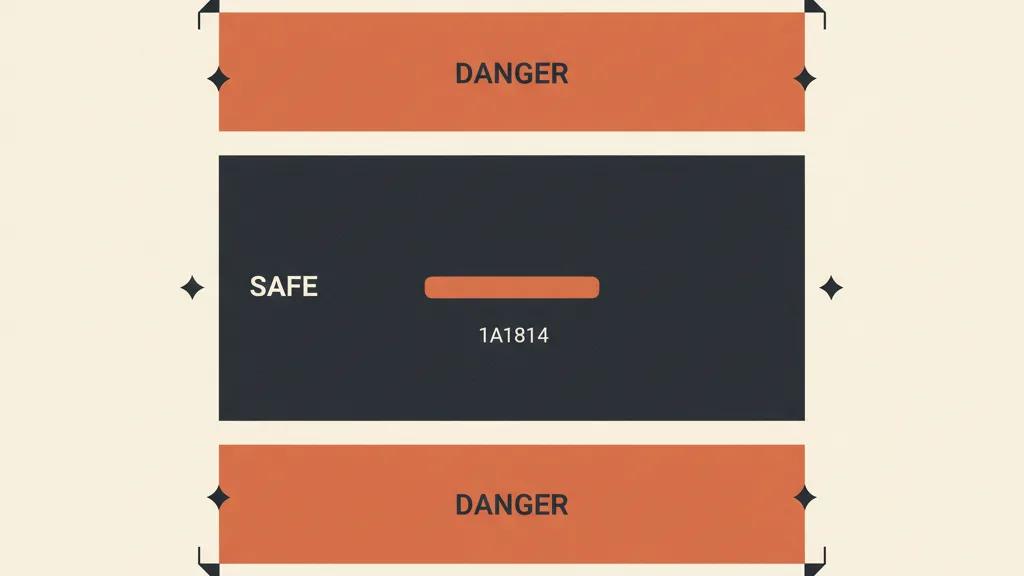
This is the technical point that ruins more creatives than people realize. In vertical formats (Reels, Stories) the platform's interface takes up part of the screen: at the top there's the profile name and the "Sponsored" label; at the bottom there are interaction buttons, the CTA, the caption, and the audio label. If you place subtitles in those areas, Meta's UI sits right on top of them and makes them unreadable. You did everything right, and then the text disappears behind an icon.
As of March 2026, Meta unified the safe zones across Facebook and Instagram, Stories and Reels, into a single 9:16 standard. Here are the areas to keep clear.
| Area of the 9:16 canvas | Percentage to leave clear | What the platform puts there |
|---|---|---|
| Top | about 14% | Profile name, username, "Sponsored" label |
| Bottom | 20% up to 35% | CTA, interaction icons, caption, audio label, platform caption |
| Sides | about 6% per side | Safety margin, side UI elements |
The bottom margin is the trickiest because it's variable: the system caption expands based on its length and the device. If the description goes past 125 characters, a "More" appears, and when the user taps it, the expansion can cover up to half the screen. The safe rule: treat the bottom 35% as off-limits and place subtitles in the central band, where no interface ever reaches.
A tool that saves you from mistakes is the built-in check in Ads Manager, which overlays the safe and at-risk areas on the creative during upload. It takes two minutes per placement and saves you from discovering cut-off text only after you've already spent budget. We've dedicated a full guide to this: Meta Ads safe zones explained placement by placement. It's also worth deciding upfront which ad format to choose, since subtitle handling changes between vertical and square.
Want video ads that are already subtitled and sound-off ready, at the pace Meta's algorithm demands, without editing them one by one? Tell us about your case and we'll show you how to set up an automated creative production pipeline.
Subtitles and creative production: the bottleneck
So far the theory is clear. The practical problem every company runs into is scale. Subtitling a video well takes time: transcription, sync, styling, checking safe zones across every placement. Doing it for one creative is quick. Doing it for twenty variants a week, to feed serious testing, turns into manual work that eats up hours.
And this is exactly where the topic connects to the direction Meta advertising is heading. With automated campaign optimization systems, the factor advertisers actually control is the creative: the quantity, variety, and quality of the videos you feed the algorithm. The more valid variants you produce, the more material the algorithm has to find the combinations that convert. Subtitles are a non-negotiable part of every variant, and they're exactly the kind of repetitive work that's perfect to automate.
This shifts the conversation from individual subtitles to the production process. The competitive edge is no longer "I know how to make a good subtitle," but "I can systematically churn out lots of sound-off-ready, well-subtitled, on-brand creatives." Whoever produces one creative at a time by hand falls behind whoever has a pipeline set up. If this topic interests you, we've written about how to produce ad creatives with AI and about how many creatives you need per month on Meta to keep up with what the algorithm demands.
Mistakes to avoid with subtitles
Here's a rundown of the most common stumbles — the ones that show up even in creatives made by people who should know better.
- Subtitles at the bottom "because that's how it's done." That's a movie habit, but on social the bottom band is occupied by the UI. Keep text centered or upper-center.
- Tiny text. Designed while looking at a monitor, unreadable on a phone. Always check on mobile.
- No background behind the text. Works for three shots, then the scene changes and white text disappears against a light background.
- Blocks of text that are too long. They force people to stop and read, killing the rhythm. Keep it to a few words per screen.
- Only the hook is subtitled. If you subtitle the first few seconds and then stop, viewers on mute miss the heart of the message. Subtitle all the relevant speech.
- Unreviewed auto-generated subtitles. Auto-transcription gets names, numbers, and product terms wrong. A subtitle error on a price or a benefit is direct damage. Always check it.
None of these mistakes are technical or expensive to fix. They're attention lapses, and they're eliminated with a small review protocol before publishing — exactly the way it pays to handle copy. If you produce a lot of creatives, a shared team checklist wipes out most of the repetitive slip-ups.
In short
Subtitles in video ads aren't an accessibility add-on to tack on at the end. They're the main channel through which the message reaches the majority of the audience, who watch in silence. They lift hold rate, guarantee comprehension, and widen the pool of viewers. To actually help, they need to be readable (contrast, font, size), well-paced (few words, sync), and placed within the updated safe zones, away from the areas occupied by Meta's interface.
But the real leap isn't making one good subtitle — it's being able to produce many of them, consistent and sound-off-ready, at the pace modern campaigns demand. That's where the topic stops being a post-production detail and becomes a matter of creative process and automation. And it's the game a large share of 2026 performance is being decided on.
Frequently asked questions
Is it really true that 85% of social videos are watched without sound?
That's the most-cited industry estimate, and it should be treated as a benchmark, not an official figure — Meta has never confirmed the number. Still, it's consistent with real behavior (muted autoplay by default, use in public settings). The practical takeaway doesn't change: design every video ad to work perfectly on mute.
Are open subtitles (burned into the video) better than the platform's automatic captions?
Open subtitles — the ones you burn directly into the video edit — are better. They give you control over font, color, position, and styling, and they look the same on every device. The platform's automatic captions aren't 100% reliable and you have no control over how they look. If you use them, always review them.
Where should subtitles be placed in a Reel or a Story?
In the central band of the video. As of March 2026, Meta uses a unified 9:16 safe zone: leave about 14% clear at the top (profile name, "Sponsored" label) and up to 35% at the bottom (CTA, icons, caption, system caption). The sides need about 6% clear on each side. The center is the only zone that's always safe.
Do subtitles actually help performance, or is it just about accessibility?
They help performance in concrete ways. They improve hold rate because viewers immediately understand what they're watching, and moving text catches the eye even in silence. They ensure the message reaches a sound-off audience. Accessibility is an added benefit, not the only reason to use them.
How much text should I put on each subtitle screen?
Not much: one or two short lines, a few words readable at a glance. Long blocks of text force people to stop and read, breaking the video's rhythm. It's better to break the speech into short phrases and sync them tightly with the voice.
How do I handle subtitles if I'm producing a lot of creatives every week?
By hand it becomes a bottleneck: transcription, sync, and safe-zone checks on every variant eat up hours. At high volume, it's worth setting up a production pipeline, AI-assisted if needed, that generates creatives already subtitled and on-brand. That's how you keep up with the pace Meta's automated campaigns require.
If you want to turn subtitles from manual work into part of a creative process that scales, let's talk: we'll look at your campaigns together and figure out how to feed them more winning variants.